2019-07-10

Windows Schedule Failed to start.


Reference URL:

  1. https://songvacongnghe.blogspot.com/2017/02/loi-task-scheduler-failed-to-start.html
  2. https://systemadminguide.wordpress.com/2014/12/17/windows-task-scheduler-error-2147943730-reported/


Scenario:
Windows Schedule Failed to start.
Error Msg:
Task Scheduler failed to start "\Microsoft\Windows\Backup\Microsoft-Windows-WindowsBackup" task for user "Machine###\user_id". Additional Data: Error Value: 2147943730.


Actual caused from Error Value:
Finally, open command prompt, type net helpmsg 1330 and you will get an idea of what 2147943730 means. Simply, 2147943730 means Logon failure: the specified account password has expired.
By systemadminguide


2019-07-09

RI Binaries?


The term "Reference Implementation" (RI) relates to the JCP JSR triform delivery of Spec... more at below:


https://jdk.java.net/java-se-ri/8

RI Binaries (build 1.8.0_40-b25) under the GNU General Public License version 2


Found the term RI in post below

https://github.com/AdoptOpenJDK/TSC/issues/65

The term "Reference Implementation" (RI) relates to the JCP JSR triform delivery of Spec, RI, and TCK. OpenJDK produces the RI for each platform JSR at the point it goes GA, as you can see on the page you linked to above. The RI binaries for Java 8 and Java 11 are published once and don't change.

So it seems we are talking about hosting builds of the JDK8 updates and JDK11 stream JDK updates projects' releases - but we do that already. So what is the ask? That we host binaries of those releases that are built by Red Hat rather than AdoptOpenJDK?

The mission for AdoptOpenJDK is to have an "open and auditable" build, test, and distribution community. I don't yet see the proposal for how we achieve that by taking binaries built elsewhere. Is the plan that we link to Red Hat's open build system/build definitions somehow?


2019-07-05

Which JDK am I using?


I download JDK from here:
https://adoptopenjdk.net/

Using IDE:
Eclipse Java EE IDE for Web Developers.

Version: Photon Release (4.8.0)
Build id: 20180619-1200

Details for me to decide:
OpenJDK vs AdoptOpenJDK


2019-07-04

How to display number of items in sub-directories from command line


Reference URL:
https://askubuntu.com/questions/1150749/how-to-display-number-of-items-in-sub-directories-from-command-line/1150753#1150753


Here's a little shell function that you can use. Just add these lines to your ~/.bashrc:
lsc(){
    ## globs that don't match should expand to a null string
  shopt -s nullglob
  ## If no arguments were given use the current dir
  if [[ $# -eq 0 ]]; then
    targets="."
  ## Otherwise, use whatever was given
  else
    targets=($@)
  fi
  ## iterate over the arguments given
  for target in "${targets[@]}"; do
    ## get the contents of the target
    contents=("$target"/*)
    ## iterate over the contents
    for thing in "${contents[@]}";  do
      ## If this one is a directory
      if [[ -d "$thing" ]]; then
        ## collect the directory's contents
        count=("$thing"/*)
        ## Print the dir's name (with a '/' at the end)
        ## and the number of items found in it
        printf "%s/ (%s)\n" "$thing" "${#count[@]}"
      else
        ## If this isn't a dir, just print the name
        printf "%s\n" "$thing"
      fi
    done
  done
}
then open a new terminal and run:
lsc /path/to/dir
For example, given the following directory (the \012 are newlines in the names):


2019-06-26

crontab job report error/command not found, only error at schedule, not in manual execute sh script.


Reference URL: https://stackoverflow.com/questions/8127433/unable-to-run-a-service-command-via-cron


sbin is not in the path when run via cron. Specify the full path to service. This is probably either /sbin/service or /usr/sbin/service. You can find the path on your system by running which service.


Work around:


add " 2>&1" behind your crontab for those scripts you totally no idea how to handle "properly" in short time.


Setup apache-archiva-2.2.4


create apache-tomcat-7.0.42/bin/setenv.sh
or
a softlink apache-tomcat-7.0.42/bin/setenv.sh to existing apache-tomcat-7.0.42/bin/env.sh file

for system properties below:

CATALINA_OPTS="-Dappserver.home=$CATALINA_HOME -Dappserver.base=$CATALINA_HOME"
export CATALINA_OPTS


Best Practice - Using a Repository Manager


2019-06-25

Is right click'abled.

Yes, you can right click at here now.

Have fun.

2019-06-14

VisualWget amazing. Download a website with folders and page


https://www.raymond.cc/blog/how-to-download-all-files-from-a-folder-on-a-website-or-ftp/view-all/

https://www.raymond.cc/blog/download/did/1048/


Wget
Wget is a free and very powerful file downloader that comes with a lot of useful features including resume support, recursive download, FTP/HTTPS support, and etc. In “The Social Network” movie, Mark Zuckerberg is seen using the Wget tool to download all the student photos from his university to create Facemash. Wget is a command line tool which can be a bit difficult to use for some basic users.
VisualWget
Thankfully there are free front-end GUI’s for Wget such as VisualWget that makes it so much easier to use Wget by simply clicking on the check boxes rather than manually typing the command line arguments. Download VisualWget, extract and run VisualWget.exe. Click on the New icon to open a New Download window. Enter the URL that you want to download and select the location that you want to save the files to.
VisualWget New Download
If you need to download multiple folders including subfolders, go to Advanced, click on Recursive Retrieval and tick on the first checkbox “–recursive“. Finally click OK to start downloading.
VisualWget Recursive
Although there are a few GUIs for Wget, we recommend VisualWget because it is free, portable, comes together with Wget and there is no need to download separately and manually unpacking it to the program’s folder or even configuring the path.
Read More: https://www.raymond.cc/blog/how-to-download-all-files-from-a-folder-on-a-website-or-ftp/


2019-06-11

Windows Server 2012 R2 Bare Metal Recovery failed with error 0x80070001


Hitting this issue with WinRE_WinServer2012_amd64.iso, self build by command (after install Windows ADK) and winre.wim from 9600.16384.WINBLUE_RTM.130821-1623_X64FRE_SERVER_SOLUTION_EN-US-IRM_SSSO_X64FRE_EN-US_DV5.ISO(download from microsoft)

winre.wim
Size: 210 MB (220,338,425 bytes)
Size on disk: 210 MB (220,340,224 bytes)

seems able to continue recovery by copy winre.wim from server, at path C:\Recovery\WindowsRE\Winre.wim


Winre.wim
Size: 241 MB (252,717,138 bytes)
Size on disk: 241 MB (252,719,104 bytes)

2019-06-10

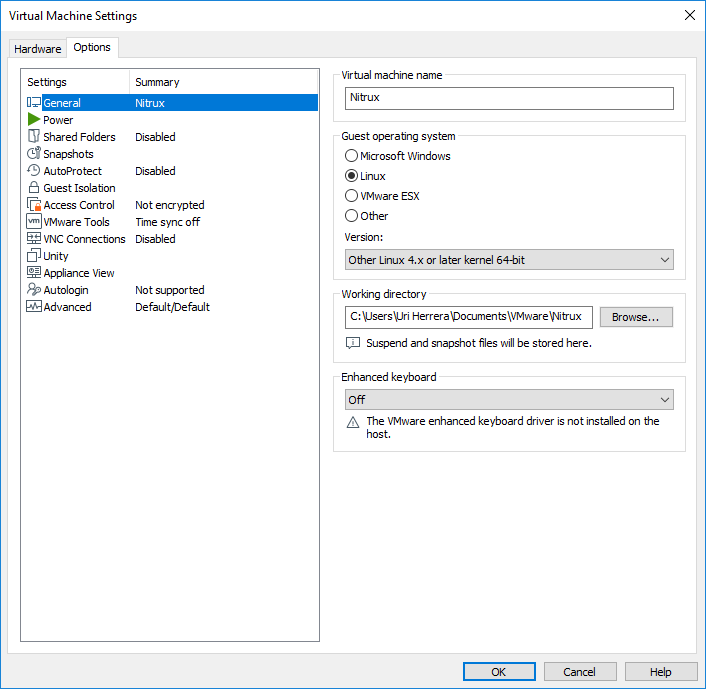
Change firmware type for VMware Workstation 15.1 player.


Solved by adding 1 line of config into vmx file in your target VM.

Reference URL: https://www.serverwatch.com/server-tutorials/enabling-uefi-on-virtual-machines.html


UEFI support must be enabled by manually editing the .VMX file or by using a third-party tool like VM Tweaker.
To manually edit the .VMX file, simply open with a text editor and add the following line and then save:
firmware = "efi"That's it — now that particular VM should run with UEFI.


All guides from google are for VMware Workstation 15.1 Pro.

  1. https://docs.vmware.com/en/VMware-Workstation-Pro/15.0/com.vmware.ws.using.doc/GUID-064517C9-14D6-4C87-8D2C-2856EFAE88EB.html?hWord=N4IghgNiBcIK4FMBmBLEBfIA
  2. https://communities.vmware.com/thread/594143


which Advance Options(under Autologin) is not available in VMware Workstation 15.1 player.(at least at my installation)


2019-05-27

To Be Find Out: Eclipse .settings


Eclipse .settings

Eclipse:
Eclipse Java EE IDE for Web Developers.
Version: Photon Release (4.8.0)
Build id: 20180619-1200

Might caused to have these xml config as below to be added automatically, right the time after you did Maven > Updates Project.

        <dependent-module archiveName="tss-lib-1.1.9-SNAPSHOT.jar" deploy-path="/WEB-INF/lib" handle="module:/resource/TssLib_Mobile_API/TssLib_Mobile_API">
            <dependency-type>uses</dependency-type>
        </dependent-module>


2019-05-23

Project 'X' is missing required Java project: 'Y'


Google'd: java maven project build path problems is missing required java project

Reference URL:
https://stackoverflow.com/questions/22050194/project-x-is-missing-required-java-project-y

reference above solving by tweaking in project x, but my case i have to tweak from project y

  1. Disable Maven nature for project y.
  2. Re convert to maven project again for project y.

2019-05-14

Enable Spring Security Web Expression(JSTL), customized Spring Security UserDetailsService


Enable Spring Security Web Expression(JSTL), customized Spring Security UserDetailsService


Reference URL:

  1. https://howtodoinjava.com/spring-security/custom-userdetailsservice-example-for-spring-3-security/ (only with JSTL)
  2. https://www.baeldung.com/spring-security-authentication-with-a-database (ONLY with encryption)


Spring 3.0 with JUnit Test 4


Reference URLs:

  1. https://yuangaopeng.com/2018/12/05/Spring%20Testing%20classpath/
  2. https://docs.spring.io/spring/docs/3.0.x/spring-framework-reference/htmlsingle/spring-framework-reference.html#integration-testing-annotations


For JUnit test with spring, either you load context configuration:

  1. manual parse xml [ApplicationContext _ctx = ClassPathXmlApplicationContext( "abc/xyz/spring-context-all.xml" ) ], access beans via _ctx.getBean()
  2. or annotation to let spring auto wired all your attributes of test cases.


And using annotation of @ContextConfiguration, I've preference to use classpath for reasons below:

  1. Spring JUnit test cases able to share xml info.
  2. multi developer environment competible.


Enable Spring Security Web Expression(JSTL)


Reference URL:

  1. https://stackoverflow.com/questions/11594104/spring-security-no-visible-websecurityexpressionhandler-instance-could-be-foun
  2. https://www.codesd.com/item/no-webapplicationcontext-found-no-contextloaderlistener.html


Added bean configuration below into applicationContext.xml to enable Spring EL

<bean id="webexpressionHandler" class="org.springframework.security.web.access.expression.DefaultWebSecurityExpressionHandler" />


To have this applicationContext.xml to be pickup, make sure listener has been added into /WEB-INF/web.xml


<listener>
<listener-class>org.springframework.web.context.ContextLoaderListener</listener-class>
</listener>


2019-05-02

Suspect text editor compare feature kinda buggie in eclipse.


Feels the text editor compare feature kinda buggie for eclipse version since Neon, Oxygen, and even Photon Release (4.8.0) too.

But no printscreen been captured at the moment...

Will look into this later if face this problem again...


2019-04-25

Seems resolved: Code Assists exception, org.eclipse.recommenders.completion.rcp


org.eclipse.recommenders.completion.rcp

With this to extend the timeout, but won't solve

-vmargs -Dorg.eclipse.jdt.ui.codeAssistTimeout=60000


taking this advice:
https://stackoverflow.com/a/1367329/676104

Eclipse Code Recommenders Mylyn Integration makes Mylyn’s task‐focused Java proposals available in Code Recommenders’ intelligent code completion. Install this feature if you want to use the Mylyn Task‐Focused Interface in conjunction with Eclipse Code Recommenders.


Uninstall Code Recommenders Mylyn Integration

But still having the exception message.


Reference URL: https://blog.csdn.net/u013066244/article/details/69054447


1、点击报错的那个连接`(Window -&gt; preferences -> java -> Editor -> Content Assist -> Advanced)`。
2、再打开的配置了面将`Default Proposal Kinds`栏中`Java Proposals (Code Recommenders)`前面的对勾去掉就可以了。
3、生效后,我的就没有提示,然后又将剩余的两个`Java Proposals`、`Java Proposals(Task-Focused)`打上对勾才正常。
--------------------- 
作者:山鬼谣me 
来源:CSDN 
原文:https://blog.csdn.net/u013066244/article/details/69054447 
版权声明:本文为博主原创文章,转载请附上博文链接!


Seems settings in redbox above is working...


2019-04-22

Resolved: The import org.hibernate.annotations.CreationTimestamp cannot be resolved


By refering to: https://stackoverflow.com/questions/32090921/deploying-maven-project-throws-java-util-zip-zipexception-invalid-loc-header-b

Solve by delete the .m2\repository\org\hibernate\hibernate-core\5.3.3.Final
And did a Maven Update.


Awaiting to verify: might triggered by migrated from Oracle JDK to AdoptOpenJDK


Initially thought was causing by Builders of Spring(Spring Project Builder& Spring Boot Validations Builder) was not there.

Project Natures also missing Spring relevant component.


Then the import org.hibernate.annotations.CreationTimestamp cannot be resolved


Found exists in Maven Dependency.


But when double click the CreationTimestamp.class, it shows invalid LOC header (bad signature).
java.util.zip.ZipException: invalid LOC header (bad signature)
at java.util.zip.ZipFile.read(Native Method)
at java.util.zip.ZipFile.access$1400(ZipFile.java:60)
at java.util.zip.ZipFile$ZipFileInputStream.read(ZipFile.java:734)
at java.util.zip.ZipFile$ZipFileInflaterInputStream.fill(ZipFile.java:434)
at java.util.zip.InflaterInputStream.read(InflaterInputStream.java:158)
at java.io.BufferedInputStream.read1(BufferedInputStream.java:284)
at java.io.BufferedInputStream.read(BufferedInputStream.java:345)
at org.eclipse.jdt.internal.compiler.util.Util.getInputStreamAsByteArray(Util.java:531)
at org.eclipse.jdt.internal.compiler.util.Util.getZipEntryByteContent(Util.java:697)
at org.eclipse.jdt.internal.core.nd.java.model.BinaryTypeFactory.rawReadTypeTestForExists(BinaryTypeFactory.java:170)
at org.eclipse.jdt.internal.core.nd.java.model.BinaryTypeFactory.rawReadType(BinaryTypeFactory.java:137)
at org.eclipse.jdt.internal.core.nd.java.model.BinaryTypeFactory.readType(BinaryTypeFactory.java:132)
at org.eclipse.jdt.internal.core.ClassFile.getJarBinaryTypeInfo(ClassFile.java:233)
at org.eclipse.jdt.internal.core.ClassFile.getBinaryTypeInfo(ClassFile.java:188)
at org.eclipse.jdt.internal.core.ClassFile.buildStructure(ClassFile.java:75)
at org.eclipse.jdt.internal.core.Openable.generateInfos(Openable.java:265)
at org.eclipse.jdt.internal.core.JavaElement.openWhenClosed(JavaElement.java:593)
at org.eclipse.jdt.internal.core.JavaElement.getElementInfo(JavaElement.java:323)
at org.eclipse.jdt.internal.core.JavaElement.getElementInfo(JavaElement.java:309)
at org.eclipse.jdt.internal.core.Openable.getBuffer(Openable.java:295)
at org.eclipse.jdt.internal.core.AbstractClassFile.getBuffer(AbstractClassFile.java:218)
at org.eclipse.jdt.internal.core.AbstractClassFile.getSourceRange(AbstractClassFile.java:344)
at org.eclipse.jdt.internal.ui.javaeditor.ClassFileEditor.probeInputForSource(ClassFileEditor.java:789)
at org.eclipse.jdt.internal.ui.javaeditor.ClassFileEditor.doSetInput(ClassFileEditor.java:688)
at org.eclipse.ui.texteditor.AbstractTextEditor$5.run(AbstractTextEditor.java:3165)
at org.eclipse.jface.operation.ModalContext.runInCurrentThread(ModalContext.java:437)
at org.eclipse.jface.operation.ModalContext.run(ModalContext.java:353)
at org.eclipse.ui.internal.WorkbenchWindow$14.run(WorkbenchWindow.java:2212)
at org.eclipse.swt.custom.BusyIndicator.showWhile(BusyIndicator.java:71)
at org.eclipse.ui.internal.WorkbenchWindow.run(WorkbenchWindow.java:2208)
at org.eclipse.ui.texteditor.AbstractTextEditor.internalInit(AbstractTextEditor.java:3183)
at org.eclipse.ui.texteditor.AbstractTextEditor.init(AbstractTextEditor.java:3208)
at org.eclipse.ui.internal.EditorReference.initialize(EditorReference.java:362)
at org.eclipse.ui.internal.e4.compatibility.CompatibilityPart.create(CompatibilityPart.java:342)
at sun.reflect.GeneratedMethodAccessor196.invoke(Unknown Source)
at sun.reflect.DelegatingMethodAccessorImpl.invoke(DelegatingMethodAccessorImpl.java:43)
at java.lang.reflect.Method.invoke(Method.java:498)
at org.eclipse.e4.core.internal.di.MethodRequestor.execute(MethodRequestor.java:55)
at org.eclipse.e4.core.internal.di.InjectorImpl.processAnnotated(InjectorImpl.java:1005)
at org.eclipse.e4.core.internal.di.InjectorImpl.processAnnotated(InjectorImpl.java:970)
at org.eclipse.e4.core.internal.di.InjectorImpl.internalInject(InjectorImpl.java:137)
at org.eclipse.e4.core.internal.di.InjectorImpl.internalMake(InjectorImpl.java:412)
at org.eclipse.e4.core.internal.di.InjectorImpl.make(InjectorImpl.java:331)
at org.eclipse.e4.core.contexts.ContextInjectionFactory.make(ContextInjectionFactory.java:190)
at org.eclipse.e4.ui.internal.workbench.ReflectionContributionFactory.createFromBundle(ReflectionContributionFactory.java:105)
at org.eclipse.e4.ui.internal.workbench.ReflectionContributionFactory.doCreate(ReflectionContributionFactory.java:74)
at org.eclipse.e4.ui.internal.workbench.ReflectionContributionFactory.create(ReflectionContributionFactory.java:56)
at org.eclipse.e4.ui.workbench.renderers.swt.ContributedPartRenderer.createWidget(ContributedPartRenderer.java:129)
at org.eclipse.e4.ui.internal.workbench.swt.PartRenderingEngine.createWidget(PartRenderingEngine.java:1012)
at org.eclipse.e4.ui.internal.workbench.swt.PartRenderingEngine.safeCreateGui(PartRenderingEngine.java:672)
at org.eclipse.e4.ui.internal.workbench.swt.PartRenderingEngine.safeCreateGui(PartRenderingEngine.java:778)
at org.eclipse.e4.ui.internal.workbench.swt.PartRenderingEngine.access$0(PartRenderingEngine.java:749)
at org.eclipse.e4.ui.internal.workbench.swt.PartRenderingEngine$2.run(PartRenderingEngine.java:743)
at org.eclipse.core.runtime.SafeRunner.run(SafeRunner.java:42)
at org.eclipse.e4.ui.internal.workbench.swt.PartRenderingEngine.createGui(PartRenderingEngine.java:727)
at org.eclipse.e4.ui.workbench.renderers.swt.StackRenderer.showTab(StackRenderer.java:1277)
at org.eclipse.e4.ui.workbench.renderers.swt.LazyStackRenderer.lambda$0(LazyStackRenderer.java:72)
at org.eclipse.e4.ui.services.internal.events.UIEventHandler$1.run(UIEventHandler.java:40)
at org.eclipse.swt.widgets.Synchronizer.syncExec(Synchronizer.java:233)
at org.eclipse.ui.internal.UISynchronizer.syncExec(UISynchronizer.java:144)
at org.eclipse.swt.widgets.Display.syncExec(Display.java:4567)
at org.eclipse.e4.ui.internal.workbench.swt.E4Application$1.syncExec(E4Application.java:212)
at org.eclipse.e4.ui.services.internal.events.UIEventHandler.handleEvent(UIEventHandler.java:36)
at org.eclipse.equinox.internal.event.EventHandlerWrapper.handleEvent(EventHandlerWrapper.java:201)
at org.eclipse.equinox.internal.event.EventHandlerTracker.dispatchEvent(EventHandlerTracker.java:196)
at org.eclipse.equinox.internal.event.EventHandlerTracker.dispatchEvent(EventHandlerTracker.java:1)
at org.eclipse.osgi.framework.eventmgr.EventManager.dispatchEvent(EventManager.java:230)
at org.eclipse.osgi.framework.eventmgr.ListenerQueue.dispatchEventSynchronous(ListenerQueue.java:148)
at org.eclipse.equinox.internal.event.EventAdminImpl.dispatchEvent(EventAdminImpl.java:135)
at org.eclipse.equinox.internal.event.EventAdminImpl.sendEvent(EventAdminImpl.java:78)
at org.eclipse.equinox.internal.event.EventComponent.sendEvent(EventComponent.java:39)
at org.eclipse.e4.ui.services.internal.events.EventBroker.send(EventBroker.java:52)
at org.eclipse.e4.ui.internal.workbench.UIEventPublisher.notifyChanged(UIEventPublisher.java:60)
at org.eclipse.emf.common.notify.impl.BasicNotifierImpl.eNotify(BasicNotifierImpl.java:374)
at org.eclipse.e4.ui.model.application.ui.impl.ElementContainerImpl.setSelectedElement(ElementContainerImpl.java:174)
at org.eclipse.e4.ui.internal.workbench.ModelServiceImpl.showElementInWindow(ModelServiceImpl.java:634)
at org.eclipse.e4.ui.internal.workbench.ModelServiceImpl.bringToTop(ModelServiceImpl.java:598)
at org.eclipse.e4.ui.internal.workbench.PartServiceImpl.delegateBringToTop(PartServiceImpl.java:788)
at org.eclipse.e4.ui.internal.workbench.PartServiceImpl.bringToTop(PartServiceImpl.java:401)
at org.eclipse.e4.ui.internal.workbench.PartServiceImpl.showPart(PartServiceImpl.java:1238)
at org.eclipse.ui.internal.WorkbenchPage.busyOpenEditor(WorkbenchPage.java:3277)
at org.eclipse.ui.internal.WorkbenchPage.access$26(WorkbenchPage.java:3192)
at org.eclipse.ui.internal.WorkbenchPage$10.run(WorkbenchPage.java:3174)
at org.eclipse.swt.custom.BusyIndicator.showWhile(BusyIndicator.java:71)
at org.eclipse.ui.internal.WorkbenchPage.openEditor(WorkbenchPage.java:3169)
at org.eclipse.ui.internal.WorkbenchPage.openEditor(WorkbenchPage.java:3133)
at org.eclipse.ui.internal.WorkbenchPage.openEditor(WorkbenchPage.java:3123)
at org.eclipse.jdt.internal.ui.javaeditor.EditorUtility.openInEditor(EditorUtility.java:373)
at org.eclipse.jdt.internal.ui.javaeditor.EditorUtility.openInEditor(EditorUtility.java:179)
at org.eclipse.jdt.ui.actions.OpenAction.run(OpenAction.java:284)
at org.eclipse.jdt.ui.actions.OpenAction.run(OpenAction.java:249)
at org.eclipse.jdt.ui.actions.SelectionDispatchAction.dispatchRun(SelectionDispatchAction.java:271)
at org.eclipse.jdt.ui.actions.SelectionDispatchAction.run(SelectionDispatchAction.java:249)
at org.eclipse.jdt.internal.ui.navigator.OpenAndExpand.run(OpenAndExpand.java:50)
at org.eclipse.ui.actions.RetargetAction.run(RetargetAction.java:216)
at org.eclipse.ui.navigator.CommonNavigatorManager$1.open(CommonNavigatorManager.java:180)
at org.eclipse.ui.OpenAndLinkWithEditorHelper$InternalListener.open(OpenAndLinkWithEditorHelper.java:46)
at org.eclipse.jface.viewers.StructuredViewer$2.run(StructuredViewer.java:850)
at org.eclipse.core.runtime.SafeRunner.run(SafeRunner.java:42)
at org.eclipse.ui.internal.JFaceUtil.lambda$0(JFaceUtil.java:44)
at org.eclipse.jface.util.SafeRunnable.run(SafeRunnable.java:173)
at org.eclipse.jface.viewers.StructuredViewer.fireOpen(StructuredViewer.java:847)
at org.eclipse.jface.viewers.StructuredViewer.handleOpen(StructuredViewer.java:1162)
at org.eclipse.ui.navigator.CommonViewer.handleOpen(CommonViewer.java:451)
at org.eclipse.jface.util.OpenStrategy.fireOpenEvent(OpenStrategy.java:273)
at org.eclipse.jface.util.OpenStrategy.access$2(OpenStrategy.java:268)
at org.eclipse.jface.util.OpenStrategy$1.handleEvent(OpenStrategy.java:308)
at org.eclipse.swt.widgets.EventTable.sendEvent(EventTable.java:86)
at org.eclipse.swt.widgets.Display.sendEvent(Display.java:4118)
at org.eclipse.swt.widgets.Widget.sendEvent(Widget.java:1052)
at org.eclipse.swt.widgets.Display.runDeferredEvents(Display.java:3931)
at org.eclipse.swt.widgets.Display.readAndDispatch(Display.java:3534)
at org.eclipse.e4.ui.internal.workbench.swt.PartRenderingEngine$5.run(PartRenderingEngine.java:1170)
at org.eclipse.core.databinding.observable.Realm.runWithDefault(Realm.java:336)
at org.eclipse.e4.ui.internal.workbench.swt.PartRenderingEngine.run(PartRenderingEngine.java:1059)
at org.eclipse.e4.ui.internal.workbench.E4Workbench.createAndRunUI(E4Workbench.java:153)
at org.eclipse.ui.internal.Workbench.lambda$3(Workbench.java:667)
at org.eclipse.core.databinding.observable.Realm.runWithDefault(Realm.java:336)
at org.eclipse.ui.internal.Workbench.createAndRunWorkbench(Workbench.java:597)
at org.eclipse.ui.PlatformUI.createAndRunWorkbench(PlatformUI.java:148)
at org.eclipse.ui.internal.ide.application.IDEApplication.start(IDEApplication.java:152)
at org.eclipse.equinox.internal.app.EclipseAppHandle.run(EclipseAppHandle.java:196)
at org.eclipse.core.runtime.internal.adaptor.EclipseAppLauncher.runApplication(EclipseAppLauncher.java:134)
at org.eclipse.core.runtime.internal.adaptor.EclipseAppLauncher.start(EclipseAppLauncher.java:104)
at org.eclipse.core.runtime.adaptor.EclipseStarter.run(EclipseStarter.java:388)
at org.eclipse.core.runtime.adaptor.EclipseStarter.run(EclipseStarter.java:243)
at sun.reflect.NativeMethodAccessorImpl.invoke0(Native Method)
at sun.reflect.NativeMethodAccessorImpl.invoke(NativeMethodAccessorImpl.java:62)
at sun.reflect.DelegatingMethodAccessorImpl.invoke(DelegatingMethodAccessorImpl.java:43)
at java.lang.reflect.Method.invoke(Method.java:498)
at org.eclipse.equinox.launcher.Main.invokeFramework(Main.java:656)
at org.eclipse.equinox.launcher.Main.basicRun(Main.java:592)
at org.eclipse.equinox.launcher.Main.run(Main.java:1498)


Another Case:
7 build path entries are missing.
# Fixed build path entries are missing.

Manual remove all classpathentry in eclipse config, .classpath
Suppose Alt + F5 , or Maven Update Project will be able to generate these automatically.




Google Referrals