Showing posts with label Angular. Show all posts

2025-11-11

Recommended NVM for Windows Versions


Query: pls list the matrix of table of node, npm, nvm for Angular version since 8, to the latest


Gemini:

Node.js Major VersionAngular Version RangeRecommended NVM for Windows VersionRationale (Confirmed Bug Fixes/Workarounds)
Node 18, 20, 22, 24Angular v15 - v20Latest Stable Release (e.g., v1.2.2)Best for current LTS versions. Includes fixes for modern download servers (Cloudflare) and new features.
Node 12, 14, 16Angular v8 - v14v1.1.12CRITICAL for EOL versions. This specific version avoids the bug in NVM v1.2.0+ that causes the "cannot find the file specified" error when attempting to install old bundled npm versions (due to an undetected URL formatting issue in Node versions below 18.0.0).

2025-10-29

Angular SSR (working with version 18)


Perfect! Let’s map out Angular Material & CDK services/components and classify them for SSR safety. This will clarify why your current mocks are necessary.


SSR Safety Map for Angular Material / CDK

Service / Component Server-Safe? Notes / SSR Issue Recommendation
MatDialog ❌ Not safe Calls Overlay.create(), which touches document. Mock with MockMatDialog
MatSnackBar ❌ Not safe Similar to Dialog, uses Overlay internally. Mock with MockMatSnackBar
Overlay (CDK) ❌ Not safe Core DOM service for popups/portals. Always crashes on SSR. Must mock (MockOverlay)
MatBottomSheet ❌ Not safe Uses Overlay under the hood. Mock (MockMatBottomSheet)
MatTooltip ⚠️ Usually safe Mostly attaches to host element lazily, but Overlay internally may be used. Optional mock for default options, safe to just provide MAT_TOOLTIP_DEFAULT_OPTIONS
MatMenu ⚠️ Usually safe Uses Overlay internally. Will crash if opened on server. Guard .open() calls or mock Overlay
MatSelect ⚠️ Usually safe Overlay for dropdown panel, crash if server tries to render panel. Mock Overlay or lazy browser-only usage
MatAutocomplete ⚠️ Usually safe Overlay for dropdown panel. Same as MatSelect
MatTable ✅ Safe Purely DOM table rendering. No mock needed
MatPaginator / MatSort ✅ Safe Only logic, no Overlay/DOM issues No mock needed
MatFormField / MatInput ✅ Safe Basic input rendering No mock needed
MatCheckbox / MatRadio / MatSlideToggle ✅ Safe No Overlay, purely DOM No mock needed
MatStepper ✅ Safe Pure DOM No mock needed
CDK DragDrop ⚠️ Conditional Needs document for coordinates if used Guard with isPlatformBrowser

Summary

  • Must Mock: Dialog, SnackBar, Overlay, BottomSheet

  • Optional / Conditional: Tooltip, Menu, Select, Autocomplete, DragDrop (only if used on server)

  • Safe: Form controls, tables, steppers, checkboxes, radios, inputs


Why Angular doesn’t provide this out-of-the-box

Angular Material assumes browser usage. Server rendering is secondary, so Angular provides no default SSR-safe mocks for Overlay or related services. You must provide them yourself—or guard usage.


If you want, I can enhance your SSR mocks even further so they cover tooltips, menus, selects, and autocomplete safely, without breaking SSR.

Do you want me to do that?


2021-12-30

What is the 1st thing to do after check out angular project from git?


What is the 1st thing to do after check out angular project from git?

Reference URL: https://stackoverflow.com/a/54142081


npm install


2021-11-18

Angular pipe could not be found


Angular pipe could not be found


Reference URL: https://stackoverflow.com/a/40463405


see this is working for me.

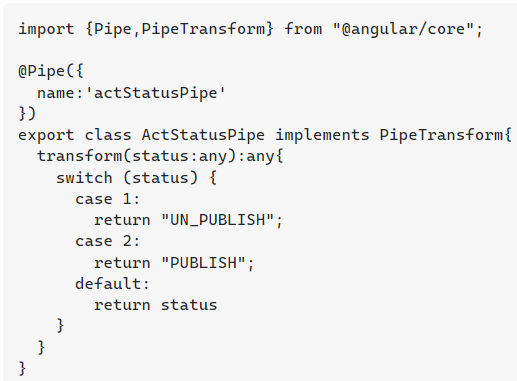
ActStatus.pipe.ts First this is my pipe

import {Pipe,PipeTransform} from "@angular/core"; @Pipe({ name:'actStatusPipe' }) export class ActStatusPipe implements PipeTransform{ transform(status:any):any{ switch (status) { case 1: return "UN_PUBLISH"; case 2: return "PUBLISH"; default: return status } } }


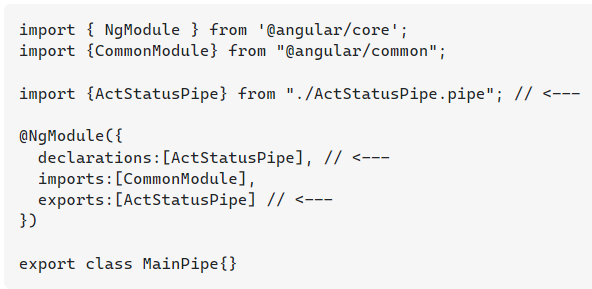
main-pipe.module.ts in pipe module, i need to declare my pipe/s and export it.

import { NgModule } from '@angular/core'; import {CommonModule} from "@angular/common"; import {ActStatusPipe} from "./ActStatusPipe.pipe"; // <--- @NgModule({ declarations:[ActStatusPipe], // <--- imports:[CommonModule], exports:[ActStatusPipe] // <--- }) export class MainPipe{}


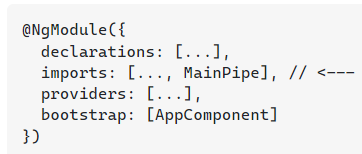
app.module.ts user this pipe module in any module.

@NgModule({ declarations: [...], imports: [..., MainPipe], // <--- providers: [...], bootstrap: [AppComponent] })


you can directly user pipe in this module. but if you feel that your pipe is used with in more than one component i suggest you to follow my approach.

  1. create pipe .

  2. create separate module and declare and export one or more pipe.

  3. user that pipe module.

How to use pipe totally depends on your project complexity and requirement. you might have just one pipe which used only once in the whole project. in that case you can directly use it without creating a pipe/s module (module approach).


2021-09-10

Angular 8 ng-select value object


Because you set the binding to ID: bindValue="ID". Remove it and it should work.

Read more about bindings here: https://ng-select.github.io/ng-select#/bindings


Source URL: https://stackblitz.com/run?file=src%2Fbindings-default-example.component.ts


html

<ng-select [items]="defaultBindingsList"
           [(ngModel)]="selectedCity">
</ng-select>


ts
import { ComponentOnInit } from '@angular/core';

@Component({
    selector: 'bindings-default-example',
    templateUrl: './bindings-default-example.component.html',
    styleUrls: ['./bindings-default-example.component.scss']
})
export class BindingsDefaultExampleComponent implements OnInit {

    defaultBindingsList = [
        { value: 1label: 'Vilnius' },
        { value: 2label: 'Kaunas' },
        { value: 3label: 'Pavilnys'disabled: true }
    ];

    selectedCity = null;

    ngOnInit() {
        this.selectedCity = this.defaultBindingsList[0];
    }
}


Angular 8 bindLabel append values


Both has no issue to show appended "full name".

Eventually go for option#2, which loop through the list to custom the display label, as the ng-select filtering in options#1 won't search through item.lastName.


Option#1
Source URL: https://stackoverflow.com/a/56531503

It is possible to display it via a custom label and item template:

<ng-select [items]="users" bindLabel="firstName"> 

  <ng-template ng-label-tmp let-item="item">
      <span >{{ item.firstName + ' ' + item.lastName }}</span>
  </ng-template>
  <ng-template ng-option-tmp let-item="item" let-search="searchTerm" let-index="index">
        <span >{{ item.firstName + ' ' + item.lastName }}</span>
  </ng-template>

</ng-select>


Displaying values with interpolation
Interpolation refers to embedding expressions into marked up text. By default, interpolation uses the double curly braces {{ and }} as delimiters.


if using Option#1 u might need to check optional checking as below, in case u got undefined for both value to be appended.

<span >{{ item? item.firstName + ' ' + item.lastName:'' }}</span>


You can use nested ternary if

{{element.source == 1 ? 'upwork' : (element.source == 2 ? 'refer from friend' : '')}}

or probably better

export class MyComponent {
  sourceNames = {1: 'upwork', 2: 'refer from friend', 3: 'other' };
}
{{sourceNames[element.source]}}


Option#2

ng-select only accepts a string value in the attribute. I may be misunderstanding but I believe that if you say bindLabel="firstName+lastName", ng-select is attempting to reference item[firstNamelastName] which does not exist.

I think your best option is to transform the collection. You can add a .map to the end of your array declaration and use bindLabel="fullName" in your template:

[
  {firstName: "John", lastName: "Doe"},
  {firstName: "Jane", lastName: "Doe"}
].map((i) => { i.fullName = i.firstName + ' ' + i.lastName; return i; });


2020-09-18

Visual Studio Code cannot detect installed git


Open Visual Studio Code

File > Preference > Settings

or

Ctrl + , 


in Search Settings: git.path


Click edit in settings.json, and edit as below, end with git.exe


Google Referrals