soupui post api download file
https://www.soapui.org/getting-started/working-with-soapui/saving-responses/

https://community.smartbear.com/discussions/readyapi-questions/resdump-file-option-for-request-properties-is-not-editable/39116


My html table:
<table id="listaVideos2" class="display">
        <thead>
        <tr>
            <th>nombre</th>
            <th>descripcion</th>
            <th>codigoYoutube</th>
            <th>bpm</th>
        </tr>
        </thead>
    </table>
My JavaScript:
$.ajax({
        "url": "listado2",
        "type": "GET",
        "datatype": 'json',
        "success": function (data) {
            $('#listaVideos2').DataTable({
                "fixedHeader" : true,
                "paging":   false,
                "info":     true,
                "autoWidth": true,
                "order": [],
                data: data,
                select: true,
                columns: [
                    { "data": "nombre" },
                    { "data": "descripcion" },
                    { "data": "codigoYoutube",
                        "title": "Youtube",
                        "orderable": false
                    },
                    { "data": "bpm" },
                ]
            });
        }
    });
or another way you can use:
$('#listaVideos2').DataTable({
        "fixedHeader" : true,
        "paging":   false,
        "info":     true,
        "autoWidth": true,
        "order": [],
        ajax: {
            url: 'listado2',
            dataSrc: ''
        },
        select: true,
        columns: [
            { "data": "nombre" },
            { "data": "descripcion" },
            { "data": "codigoYoutube",
                "title": "Youtube",
                "orderable": false
            },
            { "data": "bpm" },
        ],
        buttons: [
            { extend: "create", editor: editor },
            { extend: "edit",   editor: editor },
            { extend: "remove", editor: editor }
        ],
        dom: "Bfrtip",
    });
And my Controller: (if your controller is a @RestController I think you wouldn't need the @ResponseBody)
@GetMapping("/listado2")
    @ResponseBody
    public List<Video> apiListadoVideos() {
        return videosServicio.buscarTodosLosVideos();
    }
where my Video class is this simple (I just remove de getters, setters...):
public class Video {
    private Integer id;
    @NotEmpty
    @NotBlank
    private String nombre;
    private String descripcion;
    @NonNull @NotBlank
    private String codigoYoutube;
    private String bpm;
    private Categoria categoria;
    private Tono tono;
    private Modo modo;
}
formData.append( 'dtoName', new Blob([JSON.stringify(dtoJavascriptObject)], {type: "application/json"}));
@RequestPart ManualGenerateCsv dtoName
Reference URL: https://stackoverflow.com/a/40463405
see this is working for me.
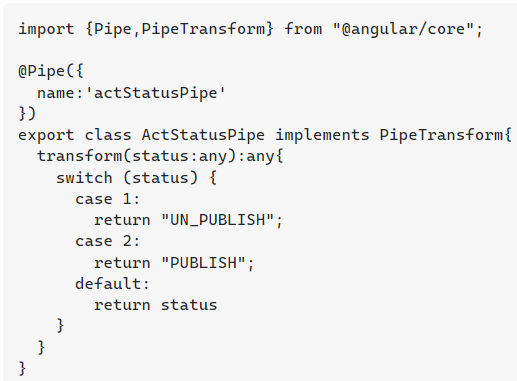
ActStatus.pipe.ts First this is my pipe
import {Pipe,PipeTransform} from "@angular/core"; @Pipe({ name:'actStatusPipe' }) export class ActStatusPipe implements PipeTransform{ transform(status:any):any{ switch (status) { case 1: return "UN_PUBLISH"; case 2: return "PUBLISH"; default: return status } } }
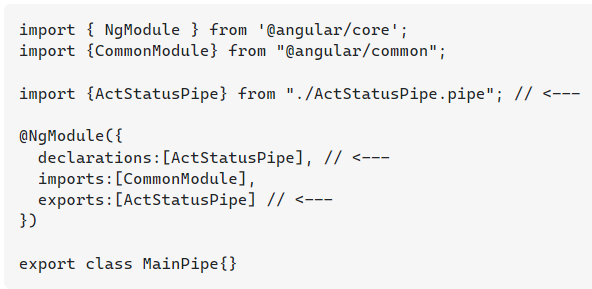
main-pipe.module.ts in pipe module, i need to declare my pipe/s and export it.
import { NgModule } from '@angular/core'; import {CommonModule} from "@angular/common"; import {ActStatusPipe} from "./ActStatusPipe.pipe"; // <--- @NgModule({ declarations:[ActStatusPipe], // <--- imports:[CommonModule], exports:[ActStatusPipe] // <--- }) export class MainPipe{}
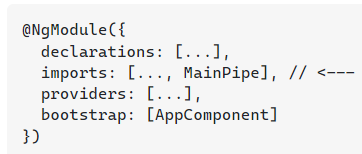
app.module.ts user this pipe module in any module.
@NgModule({ declarations: [...], imports: [..., MainPipe], // <--- providers: [...], bootstrap: [AppComponent] })
you can directly user pipe in this module. but if you feel that your pipe is used with in more than one component i suggest you to follow my approach.
create pipe .
create separate module and declare and export one or more pipe.
user that pipe module.
How to use pipe totally depends on your project complexity and requirement. you might have just one pipe which used only once in the whole project. in that case you can directly use it without creating a pipe/s module (module approach).
Because you set the binding to ID: bindValue="ID". Remove it and it should work.
Read more about bindings here: https://ng-select.github.io/ng-select#/bindings
It is possible to display it via a custom label and item template:
<ng-select [items]="users" bindLabel="firstName">

  <ng-template ng-label-tmp let-item="item">
      <span >{{ item.firstName + ' ' + item.lastName }}</span>
  </ng-template>
  <ng-template ng-option-tmp let-item="item" let-search="searchTerm" let-index="index">
        <span >{{ item.firstName + ' ' + item.lastName }}</span>
  </ng-template>

</ng-select>
Displaying values with interpolationInterpolation refers to embedding expressions into marked up text. By default, interpolation uses the double curly braces {{ and }} as delimiters.
<span >{{item? item.firstName + ' ' + item.lastName:'' }}</span>
You can use nested ternary if
{{element.source == 1 ? 'upwork' : (element.source == 2 ? 'refer from friend' : '')}}
or probably better
export class MyComponent {
  sourceNames = {1: 'upwork', 2: 'refer from friend', 3: 'other' };
}
{{sourceNames[element.source]}}
ng-select only accepts a string value in the attribute. I may be misunderstanding but I believe that if you say bindLabel="firstName+lastName", ng-select is attempting to reference item[firstNamelastName] which does not exist.
I think your best option is to transform the collection. You can add a .map to the end of your array declaration and use bindLabel="fullName" in your template:
[
  {firstName: "John", lastName: "Doe"},
  {firstName: "Jane", lastName: "Doe"}
].map((i) => { i.fullName = i.firstName + ' ' + i.lastName; return i; });