Showing posts with label apacheMaven阿帕奇. Show all posts

2025-10-21

The package is accessible from more than one module: , java.xml


The package is accessible from more than one module: <unnamed>, java.xml


Eclipse
Maven

Caused by: given pom.xml dependencies conflict of packages or classes file.

mine was easy, just remove dependencies duplicated with packages or classes in JDK.


<dependency>
<groupId>xml-apis</groupId>
<artifactId>xml-apis</artifactId>
<version>1.4.01</version>
<scope>compile</scope>
</dependency>

2025-08-07

Maven Build Skip Test


"maven.test.skip.exec=true" the tests get compiled, but not executed.

"maven.test.skip=true" doesn't compile or execute the tests.

"-DskipTests" is the same as "maven.test.skip.exec=true"
Paul Verest's user avatar
Paul Verest
64.4k54 gold badges226 silver badges


2025-07-07

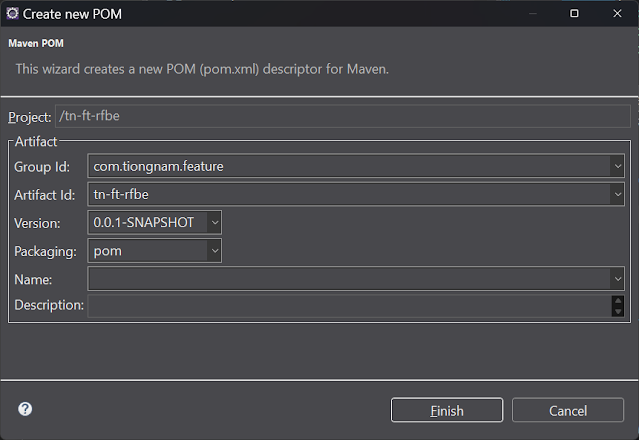
Initial eclipse maven pom project

 
Initial eclipse maven pom project

Right click [Configure] > [Convert to Maven Project]


Select packaging: pom


2025-01-22

Eclipse version 2023 working with maven jdk 21 project


20250122T163453+0800 

Googled: eclipse version 2023 maven jdk 21

Search Labs | AI Overview


To use Java 21 with Maven in Eclipse, you should use Eclipse version 2023-12 as it provides full support for the Java 21 features; this means you can use the latest Eclipse release available and configure your project to use the JDK 21 within it. 

Key points:

  • Eclipse version: 2023-12
  • Java version (JDK): 21
  • Maven integration: Eclipse comes pre-loaded with the "M2E" plugin for Maven integration. 


Google Referrals