2019-01-25

JDK 8u201 vs 8u202


Critical Patch Update (CPU)
XUXX[odd number] releases more stable, default option for production, unless production require patch in Patch Set Update (PSU).

eg: 8u201


Patch Set Update (PSU)
XUXX[even number] releases has more patches, but less stable than XUXX[odd number]

eg: 8u202


Reference URL: https://www.oracle.com/technetwork/java/javase/cpu-psu-explained-2331472.html

Which Java version should I choose: the CPU or the PSU?

Oracle strongly recommends that all Java SE users upgrade to the latest CPU release available for a release family. Most users should choose the CPU release.
Users should only use the corresponding PSU release if they are being impacted by one of the additional bugs fixed in that version as noted in the release notes.
The subsequent CPU release will contain all of the fixes from the current PSU. For this reason, organizations should test the current PSU in their environment in anticipation of these fixes being included in the next CPU.

What is the difference between a Java CPU and PSU release?

Java SE Critical Patch Updates (CPU) contain fixes to security vulnerabilities and critical bug fixes. Oracle strongly recommends that all Java SE users upgrade to the latest CPU releases as they are made available. Java SE CPU releases are odd numbered versions (i.e. 7u71, 7u65 – see more on Java SE version numbering schemes here).
Java SE Patch Set Updates (PSU) contain all of fixes in the corresponding CPU, as well as additional non-critical fixes. Java PSU releases should only be used if you are being impacted by one of the additional bugs fixed in that version. The release notes call out the additional fixes available in Java SE PSU releases.

Is the cadence of CPU releases changing?

As before, Java SE CPU releases are scheduled for release on the Tuesday closest to the 17th day of January, April, July and October under the normal Oracle Critical Patch Update schedule.
Starting in October 2014 with the release of Java SE 7u71 (CPU) and Java SE 7u72 (PSU), Oracle plans to additionally release a corresponding PSU release along with each CPU release for Java SE 7. PSU releases provide organizations and developers with access to non-critical fixes in addition to the critical fixes contained in the corresponding CPU.


Reference URL: https://blog.csdn.net/u014653815/article/details/80435226

JAVA版本8u201与8u202的区别


Reference URL: https://www.reddit.com/r/java/comments/8d3i9e/jdk_8u171_vs_jdk_8u172/?st=jhk8n1q9&sh=49328aa6

JDK 8u171 vs JDK 8u172


level 2
For those who are too lazy to read the article:
  • Odd-numbered releases have critical fixes only.
  • Even-numbered releases include non-critical fixes.
Oracle recommends only using the even-numbered releases "if you are being impacted by one of
the additional bugs fixed in that version." Although in my experience, it hasn't mattered much.


Theoretically, the one with critical fixes only is more stable. Upgrading from 8u151 to 8u171 has
fewer changes than 8u151 to 8u172, so there are fewer chances that things will break.
And unless you need the non-critical fixes, there's not really any benefit to upgrading, so why take the risk?
As an end user though, I haven't seen any difference. If you're not running anything super mission-critical,
it probably doesn't matter.


奇数 vs 偶数


Reference URL: https://www.shuxuele.com/numbers/even-odd.html

偶数与奇数

偶数与奇数

偶数

任何可以被 2 整除的整数就是偶数
偶数的最后一个数位是 0246 或 8
例子:−24、 0、6 和 38 都是偶数

奇数

任何不能被 2 整除的整数就是奇数
奇数的最后一个数位是 1357 或 9
例子:−3、1、7 和 35 都是奇数
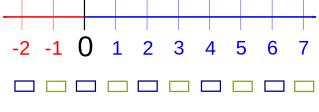
每个奇数是在两个偶数中间的(当然,反之亦然。)


2019-01-24

Eclipse: java.lang.NoSuchMethodError


java.lang.NoSuchMethodError: javax.jms.Connection.createSession(ZI)Ljavax/jms/Session; at test.<packages path>.jms.QueueConnector.TestQueueConnector.testActiveMQConnectionFactory(TestQueueConnector.java:67) at sun.reflect.NativeMethodAccessorImpl.invoke0(Native Method) at sun.reflect.NativeMethodAccessorImpl.invoke(NativeMethodAccessorImpl.java:62) at sun.reflect.DelegatingMethodAccessorImpl.invoke(DelegatingMethodAccessorImpl.java:43) at java.lang.reflect.Method.invoke(Method.java:498) at org.junit.runners.model.FrameworkMethod$1.runReflectiveCall(FrameworkMethod.java:50) at org.junit.internal.runners.model.ReflectiveCallable.run(ReflectiveCallable.java:12) at org.junit.runners.model.FrameworkMethod.invokeExplosively(FrameworkMethod.java:47) at org.junit.internal.runners.statements.InvokeMethod.evaluate(InvokeMethod.java:17) at org.junit.runners.ParentRunner.runLeaf(ParentRunner.java:325) at org.junit.runners.BlockJUnit4ClassRunner.runChild(BlockJUnit4ClassRunner.java:78) at org.junit.runners.BlockJUnit4ClassRunner.runChild(BlockJUnit4ClassRunner.java:57) at org.junit.runners.ParentRunner$3.run(ParentRunner.java:290) at org.junit.runners.ParentRunner$1.schedule(ParentRunner.java:71) at org.junit.runners.ParentRunner.runChildren(ParentRunner.java:288) at org.junit.runners.ParentRunner.access$000(ParentRunner.java:58) at org.junit.runners.ParentRunner$2.evaluate(ParentRunner.java:268) at org.junit.runners.ParentRunner.run(ParentRunner.java:363) at org.eclipse.jdt.internal.junit4.runner.JUnit4TestReference.run(JUnit4TestReference.java:86) at org.eclipse.jdt.internal.junit.runner.TestExecution.run(TestExecution.java:38) at org.eclipse.jdt.internal.junit.runner.RemoteTestRunner.runTests(RemoteTestRunner.java:538) at org.eclipse.jdt.internal.junit.runner.RemoteTestRunner.runTests(RemoteTestRunner.java:760) at org.eclipse.jdt.internal.junit.runner.RemoteTestRunner.run(RemoteTestRunner.java:460) at org.eclipse.jdt.internal.junit.runner.RemoteTestRunner.main(RemoteTestRunner.java:206)

is causing by this: http://activemq.apache.org/javalangnosuchmethoderror.html

but need to trace by using: https://billson.blogspot.com/2019/01/eclipse-check-classes-from-which-jar.html


Eclipse check classes from which jar


Reference URL:
https://dzone.com/articles/how-use-verbose-options-java


Command line, eg:
java -verbose:class -cp "abc.jar" com.test.Hello


In Eclipse, menu(in windows: File, Edit, Source, Refactor, etc...):

Run > Run Configurations.
Select correct Configuration from left panel, go to tab: (x)= Arguments
in textbox from group: VM arguments:

paste:
-verbose:class

then will get sysout in eclipse console


eg:
[Loaded org.slf4j.helpers.SubstituteLoggerFactory from file:/<maven path>/.m2/repository/org/slf4j/slf4j-api/1.7.13/slf4j-api-1.7.13.jar]
[Loaded org.slf4j.Logger from file:/<maven path>/.m2/repository/org/slf4j/slf4j-api/1.7.13/slf4j-api-1.7.13.jar]
[Loaded org.slf4j.helpers.NOPLoggerFactory from file:/<maven path>/.m2/repository/org/slf4j/slf4j-api/1.7.13/slf4j-api-1.7.13.jar]
[Loaded org.slf4j.helpers.Util from file:/<maven path>/.m2/repository/org/slf4j/slf4j-api/1.7.13/slf4j-api-1.7.13.jar]
[Loaded java.lang.SecurityException from C:\Program Files\Java\jdk1.8.0_192\jre\lib\rt.jar]
[Loaded java.util.LinkedHashSet from C:\Program Files\Java\jdk1.


2019-01-17

List files and folders, then grep / findstr to filter keyword ignore case.


Linux: ls -lrth | grep -i FIL
Reference URL: https://stackoverflow.com/questions/8498407/grep-ignore-case-only

...

[billson@999 ~]$ grep --version
grep (GNU grep) 2.20
Copyright (C) 2014 Free Software Foundation, Inc.
License GPLv3+: GNU GPL version 3 or later <http://gnu.org/licenses/gpl.html>.
This is free software: you are free to change and redistribute it.
There is NO WARRANTY, to the extent permitted by law.

Written by Mike Haertel and others, see <http://git.sv.gnu.org/cgit/grep.git/tree/AUTHORS>.

...

[billson@999 ~]$ ls -lrth | grep -i FIL

drwxrwxr-x. 2 billson billson 4.0K Jan  7 15:24 audit_filtered


Windows: dir /B | findstr /l /i eai
Reference URL: https://superuser.com/questions/300815/grep-equivalent-for-windows-7


1 of 2

F:\Users\billson\mars.2>dir /B | findstr /l /i eai
XXXXXXSpam_EAI
XXXXX_SXX_EAI_ProduXXXr
XXXXP_EAI_ProductinoDecompiledJad


2 of 2

F:\Users\billson\mars.2>dir /B | findstr /l /i api
API_XS_IXXXace
API_TX_IPX_woXs
API_TXXXedJad
API_TMMXXXXto
API_TMMXXup
CeXXA_API
CXaXxxXXe_API_Jesvyn
CXile_API
DeloXXXXXXXBiApi
FxXO_API
MXP_API
XXXXXXXXXile_API


2019-01-16

ActiveMQ JMX - Password Protecting service:jmx:rmi(port:1099) & tcp(port:61616)


Password Protecting the Broker - service:jmx:rmi: (JMX Connector)
Implemented: activemq.bat & activemq.xml

Reference URL:

in file: activemq.xml
Change:    <broker xmlns="http://activemq.apache.org/schema/core" brokerName="localhost" dataDirectory="${activemq.data}">
To:    <broker xmlns="http://activemq.apache.org/schema/core" brokerName="localhost" dataDirectory="${activemq.data}" useJmx="true">

Optional:
Change: <managementContext createConnector="false"/>
To: <managementContext createConnector="true" rmiServerPort="1098"  connectorPort="1099" />


in file: activemq.bat
After line of: if "%ACTIVEMQ_SUNJMX_START%" == "" set ACTIVEMQ_SUNJMX_START=-Dcom.sun.management.jmxremote
SET ACTIVEMQ_SUNJMX_START=-Dcom.sun.management.jmxremote.port=1099 -Dcom.sun.management.jmxremote.ssl=false -Dcom.sun.management.jmxremote.password.file="%ACTIVEMQ_BASE%/conf/jmx.password" -Dcom.sun.management.jmxremote.access.file="%ACTIVEMQ_BASE%/conf/jmx.access"
Double quote (") here to avoid space in ur full path.
eg:  "C:\Program Files\ActiveMQ\"


Test if startup correctly:
Reference URL:
http://www.cleantutorials.com/jconsole/downloading-jconsole-and-connecting-it-to-a-local-java-process

Run: C:\Program Files\Java\jdk1.8.0_192\bin\jconsole.exe

host=localhost:1099
id=admin
password=activemq


Caused by:
Error: Password file read access must be restricted: <Path>\ActiveMQ\apache-activemq-5.13.2\bin\../conf/jmx.password
sun.management.AgentConfigurationError
        at sun.management.jmxremote.ConnectorBootstrap.checkPasswordFile(ConnectorBootstrap.java:577)
        at sun.management.jmxremote.ConnectorBootstrap.startRemoteConnectorServer(ConnectorBootstrap.java:426)
        at sun.management.Agent.startAgent(Agent.java:262)
        at sun.management.Agent.startAgent(Agent.java:452)


Reference URL:
https://docs.oracle.com/javase/6/docs/technotes/guides/management/security-windows.html

Solved by:

 To Secure a Password File on Windows XP Home Edition

As stated above, Windows XP Home Edition does not allow you to set file permissions graphically. However, you can set permissions using the cacls command.
  1. Open a command prompt window.
  2. Run the following command
    C:\MyPasswordFile>cacls jmxremote.password
    
    This command displays the access control list (ACL) of the jmxremote.password file.
  3. Set the access rights so that only your username has read access.
    When no users have been configured on the machine the default username is usually Owner, or a localized translation of Owner.
    C:\MyPasswordFile>cacls jmxremote.password /P [Owner]:R
    
    This command grants access to the user Owner with read-only permission, where Owner is the owner of the jmxremote.password file.
  4. Display the ACL again.
    C:\MyPasswordFile>cacls jmxremote.password
    
    This time, you will see that only the Owner has access to the password file.


How to identify [Owner] at above command:


Reference URL:
https://www.windows-commandline.com/current-logged-in-user-name-command/

Solved by:
ECHO %username%
or
whoami


Caused by:
java.lang.SecurityException: Authentication failed! Credentials required


Reference URL:
https://stackoverflow.com/questions/4679877/tomcat-jmx-connection-authentication-failed?rq=1

Solved by: Add credential into config and pass into connect function:

...
String url = "JMSRMIURL=service:jmx:rmi://localhost:1098/jndi/rmi://localhost:1099/jmxrmi";
JMXServiceURL urlJmxService = new JMXServiceURL( url );
Hashtable<String, String[]> credential = new Hashtable<String, String[]>();
credential.put(JMXConnector.CREDENTIALS, new String[]{"your_login_id","your_login_password"});
JMXConnector connector = JMXConnectorFactory.connect( urlJmxService, credential);
connector.connect();
...

Reference:
JMXServiceURL url = new JMXServiceURL(urlString);         
Hashtable<String, String[]> env = new Hashtable<String, String[]>();
String[] credentials = new String[] {user,pass};
env.put(JMXConnector.CREDENTIALS, credentials);         
jmxc = JMXConnectorFactory.connect(url,env); 
mbsc = jmxc.getMBeanServerConnection(); 


How to stop activemq after enabled JMX:
Reference URL: http://activemq.apache.org/activemq-command-line-tools-reference.html
activemq-admin stop --jmxurl service:jmx:rmi:///jndi/rmi://localhost:1099/jmxrmi --jmxuser admin --jmxpassword activemq

activemq-admin list --jmxurl service:jmx:rmi:///jndi/rmi://localhost:1099/jmxrmi --jmxuser admin --jmxpassword activemq


But not sure even able to stop it using only: activemq-admin stop


Password Protecting the Broker - TCP(port:61616)
Implemented: activemq.xml, login.config

Reference URL:
https://blog.csdn.net/jaylong35/article/details/6968903


Issue during implementation:

Issue#1of2
...ERROR | Failed to load: class path resource [activemq.xml], reason: Line 53 in XML document from class path resource [activemq.xml] is invalid; nested exception is org.xml.sax.SAXParseException; lineNumber: 53; columnNumber: 27; Element type "authorizationEntry" must be followed by either attribute specifications, ">" or "/>".org.springframework.beans.factory.xml.XmlBeanDefinitionStoreException: Line 53 in XML document from class path resource [activemq.xml] is invalid; nested exception is org.xml.sax.SAXParseException; lineNumber: 53; columnNumber: 27; Element type "authorizationEntry" must be followed by either attribute specifications, ">" or "/>"....ERROR: java.lang.RuntimeException: Failed to execute start task. Reason: org.springframework.beans.factory.xml.XmlBeanDefinitionStoreException: Line 53 in XML document from class path resource [activemq.xml] is invalid; nested exception is org.xml.sax.SAXParseException; lineNumber: 53; columnNumber: 27; Element type "authorizationEntry" must be followed by either attribute specifications, ">" or "/>".java.lang.RuntimeException: Failed to execute start task. Reason: org.springframework.beans.factory.xml.XmlBeanDefinitionStoreException: Line 53 in XML document from class path resource [activemq.xml] is invalid; nested exception is org.xml.sax.SAXParseException; lineNumber: 53; columnNumber: 27; Element type "authorizationEntry" must be followed by either attribute specifications, ">" or "/>"....


Caused by: Having special character issue between "authorizationEntry" "queue"

authorizationEntry queue

Solved by: Use Notepad++ to replace this character(" ") by a normal space (" ").

Add the <plugin></plugin>
into config/activemq.xml


partial xml in <broker></broker> from config/activemq.xml
<plugins>
<!-- Configure authentication; Username, passwords and groups 添加jaas认证插件 activemq-domain 在login.config里面定义,详细见 login.config -->
<jaasAuthenticationPlugin configuration="ActiveMQ_Credentials" />


<!-- Lets configure a destination based authorization mechanism 配置队列用户权限,>表示任意字符 -->
<authorizationPlugin>
  <map>
    <authorizationMap>
      <authorizationEntries>
        <authorizationEntry queue=">" read="admins" write="admins" admin="admins" />
        <authorizationEntry queue="USERS.>" read="users" write="users" admin="users" />
        <authorizationEntry queue="GUEST.>" read="guests" write="guests,users" admin="guests,users" />


        <authorizationEntry queue="TEST.Q" read="guests" write="guests" />


        <authorizationEntry topic=">" read="admins" write="admins" admin="admins" />
        <authorizationEntry topic="USERS.>" read="users" write="users" admin="users" />
        <authorizationEntry topic="GUEST.>" read="guests" write="guests,users" admin="guests,users" />
        <authorizationEntry topic="ActiveMQ.Advisory.>" read="guests,users" write="guests,users" admin="guests,users"/>
      </authorizationEntries>
    </authorizationMap>
  </map>
</authorizationPlugin>
</plugins>
<!--
===================== 
作者:jaylong35 
来源:CSDN 
原文:https://blog.csdn.net/jaylong35/article/details/6968903 
版权声明:本文为博主原创文章,转载请附上博文链接!
-->


Issue#2of2
in eclipse
Caused by: java.io.IOException: Configuration Error:
Invalid control flag,

Caused by: comment is not support within config


Solved by: Remove comment


in config/login.config


ActiveMQ_Credentials {
    org.apache.activemq.jaas.PropertiesLoginModule required
reload=true
debug=true
        org.apache.activemq.jaas.properties.user="users.properties"        org.apache.activemq.jaas.properties.group="groups.properties";};


in users.properties

admin=adminggggg=aeaea


in groups.properties

admins=adminusers=ggggg


2 implementations above will have 2 sets of credential maintenance.

Following is to simplify this maintenance task:

Reference URL: https://access.redhat.com/documentation/en-US/Fuse_ESB/4.4.1/html/ActiveMQ_Security_Guide/files/JMX-AmqConnector-Authent.html


For my case, both connections(jmx service & tcp), but could be more which refer to <transportConnectors></transportConnectors>


1 of 3 edits; in activemq.xml:
Add <plugins> below into <broker></broker>


<plugins>
<!-- Configure authentication; Username, passwords and groups 添加jaas认证插件 activemq-domain 在login.config里面定义,详细见 login.config -->
<jaasAuthenticationPlugin configuration="ActiveMQ_Credentials" />


<!-- Lets configure a destination based authorization mechanism 配置队列用户权限,>表示任意字符 -->
<authorizationPlugin>
  <map>
    <authorizationMap>
      <authorizationEntries>
        <authorizationEntry queue=">" read="admins" write="admins" admin="admins" />
        <authorizationEntry queue="USERS.>" read="users" write="users" admin="users" />
        <authorizationEntry queue="GUEST.>" read="guests" write="guests,users" admin="guests,users" />


        <authorizationEntry queue="TEST.Q" read="guests" write="guests" />


        <authorizationEntry topic=">" read="admins" write="admins" admin="admins" />
        <authorizationEntry topic="USERS.>" read="users" write="users" admin="users" />
        <authorizationEntry topic="GUEST.>" read="guests" write="guests,users" admin="guests,users" />
        <authorizationEntry topic="ActiveMQ.Advisory.>" read="guests,users" write="guests,users" admin="guests,users"/>
      </authorizationEntries>
    </authorizationMap>
  </map>
</authorizationPlugin>
</plugins>
<!--
===================== 
作者:jaylong35 
来源:CSDN 
原文:https://blog.csdn.net/jaylong35/article/details/6968903 
版权声明:本文为博主原创文章,转载请附上博文链接!
-->


2 of 3 edits; in activemq.xml:
Replace
<managementContext createConnector="false" />
by
<managementContext> at below
into
<managementContext></managementContext>


<managementContext createConnector="true" rmiServerPort="1098"  connectorPort="1099" jmxDomainName="org.apache.activemq" >
<property xmlns="http://www.springframework.org/schema/beans" name="environment">
<map xmlns="http://www.springframework.org/schema/beans">
<entry xmlns="http://www.springframework.org/schema/beans"
   key="jmx.remote.x.login.config"
   value="ActiveMQ_Credentials"/>
  </map>
</property>
</managementContext>


3 of 3 edits; in login.config:
Add block below below activemq block


ActiveMQ_Credentials {
org.apache.activemq.jaas.PropertiesLoginModule required
reload=true
debug=true
org.apache.activemq.jaas.properties.user="users.properties"
org.apache.activemq.jaas.properties.group="groups.properties";
};




2019-01-15

activemq.bat


Windows 10
portable activemq

failed to start up due to:

JAVA_HOME

and

Error: Could not find or load main class Resources\M1\ActiveMQ\apache-activemq-5.13.2\bin\..\conf\login.config


Reference URL:
https://issues.apache.org/jira/browse/AMQ-5243?focusedCommentId=14349533&page=com.atlassian.jira.plugin.system.issuetabpanels%3Acomment-tabpanel#comment-14349533


JAVA_HOME
Add at the beginning of activemq.bat

SET JAVA_HOME=C:\Program Files\Java\jdk1.8.0_192\


Error: Could not find or load main class Resources\M1\ActiveMQ\apache-activemq-5.13.2\bin\..\conf\login.config

Change
if "%ACTIVEMQ_OPTS%" == "" set ACTIVEMQ_OPTS=-Xms1G -Xmx1G -Djava.util.logging.config.file=logging.properties -Djava.security.auth.login.config=%ACTIVEMQ_CONF%\login.config

to

if "%ACTIVEMQ_OPTS%" == "" set ACTIVEMQ_OPTS=-Xms1G -Xmx1G -Djava.util.logging.config.file=logging.properties -Djava.security.auth.login.config="%ACTIVEMQ_CONF%\login.config"


2018-12-26

iPhone stuck at apple logo


When you get the option to restore or update, choose Update. iTunes will try to reinstall iOS without erasing your data.

https://support.apple.com/en-sg/HT201412


After install OS, iPhone will restart, and go into this: "Attempting data recovery"
Took 2hrs for:

  1. Download itunes.
  2. Install itunes.
  3. Update iPhone 6 Plus, 128GB.
  4. Turned off, force restart.
  5. Update iPhone 6 Plus, 128GB.
  6. Data recovery.
  7. Update Completed on screen.


2018-12-21

Maven repository with ID and Password.


Referene URL:
https://www.onehippo.org/library/enterprise/enterprise-developer-information/hippo-maven-enterprise-repository-manual.html


Finding:

seems 2 sets(settings.xml & pom.xml) of maven config above linked by tag "<id>" so username & password in settings.xml will be used for repository.


2018-12-18

Install DotCms "Caused by: com.dotmarketing.exception.DotRuntimeException: No Company!"


Reference URL:
https://groups.google.com/forum/#!topic/dotcms/fxUv2Q1hy2A


Caused by: ran ./bin/startup.sh script without sudo.


Solutions:
cd /home/dotcms/Programs/CMSs/dotcms_5.0.3;

sudo ./bin/startup.sh


Google Referrals