2025-07-10

I choose Subclipse with SVNKit as of 20250710T001517+0800.


Subclipse with SVNKit

Eclipse: eclipse-jee-2025-06-R-win32-x86_64
Subclipse: https://subclipse.github.io/updates/subclipse/4.3.x/

Other URLs:
  1. https://github.com/subclipse/subclipse
  2. https://github.com/subclipse/subclipse/wiki

Here is why
https://g.co/gemini/share/dd1a4a01d75d


Cannot perform operation. Computing alternate solutions, may take a while.


Cannot complete the install because one or more required items could not be found.

Software being installed: Subclipse Integration for Mylyn (Optional) 4.2.0.1 (org.tigris.subversion.subclipse.mylyn.feature.feature.group 4.2.0.1)

Missing requirement: Subclipse Integration for Mylyn 3.x 4.2.0.1 (org.tigris.subversion.subclipse.mylyn 4.2.0.1) requires 'osgi.bundle; org.eclipse.mylyn.tasks.core [3.0.0,4.2.0)' but it could not be found

Cannot satisfy dependency:

From: Subclipse Integration for Mylyn (Optional) 4.2.0.1 (org.tigris.subversion.subclipse.mylyn.feature.feature.group 4.2.0.1)

To: org.eclipse.equinox.p2.iu; org.tigris.subversion.subclipse.mylyn [4.2.0.1,4.2.0.1]


Go back and unchecked [Subclipse Integration for Mylyn (Optional)] to proceed


2025-07-07

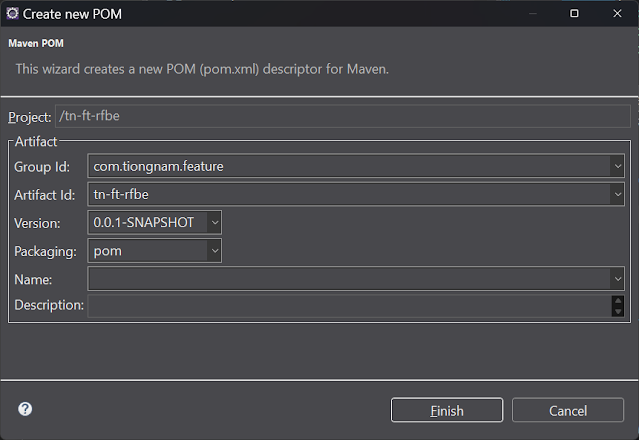
Initial eclipse maven pom project

 
Initial eclipse maven pom project

Right click [Configure] > [Convert to Maven Project]


Select packaging: pom


2025-05-29

JSON - enum as object instead of string


@JsonCreator was to address the issue of the json value as string, instead of enum object.

You're correct in your observation. The @JsonCreator annotation is indeed used to address the issue of deserializing JSON values into enum objects, not specifically for handling negative ids.
Given the context you've provided, it seems the issue might be related to how the enum values are being populated in the byId map.


2025-05-28

Tabnine@Eclipse auto complete @author jaehyun.kim?

 
Eclipse:
Version: 2025-03 (4.35.0)
Build id: 20250306-0812

Tabnine:
  Tabnine for Eclipse 1.137.0 com.tabnine.eclipse.feature.feature.group Tabnine


jaehyun.kim ?

/**

* @author jaehyun.kim

*/


2025-04-26

[Resolved] Eclipse - Windsurf Plugin 1.8.71 - Solutions are not available...


Clicked "No"


if copied the URL
https://exafunction.github.io/codeium-eclipse/

To install manually, but it seems missing of eclipse plugin...


After found this:


https://stackoverflow.com/a/78894139/6462295


It works with my Eclipse 2025 03 R too.


Next thing will be "Code Fencing"


MarketplaceDiscoveryStrategy failed with an error - Connection Failed


MarketplaceDiscoveryStrategy failed with an error

Cannot complete request to https://marketplace.eclipse.org/recent/api/p?client=org.eclipse.epp.mpc.core&os=win32&platform.version=4.35: Connection failed


This is most often caused by a problem with your internet connection. Please check your internet connection and retry.

Connection failed


This is most often caused by a problem with your internet connection. Please check your internet connection and retry.

Pipe closed


2025-04-25

MarketplaceDiscoveryStrategy failed with an error - windsurf


MarketplaceDiscoveryStrategy failed with an error

Cannot complete request to https://marketplace.eclipse.org/api/p/search/apachesolr_search/windsurf?client=org.eclipse.epp.mpc.core&os=win32&platform.version=4.35: Timeout deadline: 30000 MILLISECONDS, actual: 30016 MILLISECONDS

Timeout deadline: 30000 MILLISECONDS, actual: 30016 MILLISECONDS

Timeout deadline: 30000 MILLISECONDS, actual: 30016 MILLISECONDS

Timeout deadline: 30000 MILLISECONDS, actual: 30016 MILLISECONDS

Timeout deadline: 30000 MILLISECONDS, actual: 30016 MILLISECONDS


MarketplaceDiscoveryStrategy failed with an error - gemini, Code+Intelligence


MarketplaceDiscoveryStrategy failed with an error

Cannot complete request to https://marketplace.eclipse.org/api/p/search/apachesolr_search/Code+Intelligence?client=org.eclipse.epp.mpc.core&os=win32&platform.version=4.35: status code: 503, reason phrase: Service Unavailable

status code: 503, reason phrase: Service Unavailable

status code: 503, reason phrase: Service Unavailable


2025-04-02

"Fixed" (workaround) - Cannot sign into Minecraft -“Too many requests”


Instead of login by using "Login" button.

I able to login, by click on the "Profile" button


2025-01-22

Eclipse version 2023 working with maven jdk 21 project


20250122T163453+0800 

Googled: eclipse version 2023 maven jdk 21

Search Labs | AI Overview


To use Java 21 with Maven in Eclipse, you should use Eclipse version 2023-12 as it provides full support for the Java 21 features; this means you can use the latest Eclipse release available and configure your project to use the JDK 21 within it. 

Key points:

  • Eclipse version: 2023-12
  • Java version (JDK): 21
  • Maven integration: Eclipse comes pre-loaded with the "M2E" plugin for Maven integration. 


2024-11-20

haproxy-3.0.6 failed to chroot, explained by Gemini Code Assist


haproxy-2.6.6 was able to run with user root

but haproxy-3.0.6 hit error:

haproxy[384105]: [ALERT] (384105) : [/usr/local/sbin/haproxy.main()] Cannot chroot(/opt/haproxy/chroot).

The fact that HAProxy 2.6.6 ran as root while HAProxy 3.0.6 fails with a chroot error when run as root indicates a key difference: HAProxy 2.6.6 was not actually using chroot, even if the directive was present in the configuration file. Running as root bypasses the chroot setup because root has access to the entire filesystem. The chroot directive was effectively being ignored.

With HAProxy 3.0.6, the chroot is being correctly enforced. Since the chroot environment (/opt/haproxy/chroot) is likely missing the necessary files for HAProxy to run (its binary, libraries, configuration, etc.), it fails to start.

Here's what to do:

  1. Confirm chroot necessity: Do you actually need chroot? If not, remove the chroot /opt/haproxy/chroot line from your /etc/haproxy/haproxy.cfg. This is often the simplest and best solution.

  2. If chroot is required:

    • Populate the chroot environment: Copy the necessary files into /opt/haproxy/chroot. This includes the HAProxy binary, required libraries (use ldd /usr/local/sbin/haproxy to find them), your haproxy.cfg file, and any other files HAProxy needs (e.g., certificates). Remember, the paths inside the chroot must match the paths HAProxy expects. So, if a library is normally in /lib64/, it needs to be in /opt/haproxy/chroot/lib64/.
    • Permissions: Even as root, ensure the files within /opt/haproxy/chroot have the correct permissions for the user HAProxy runs as within the chroot.
  3. Alternatives: Consider alternatives to chroot, such as Docker or systemd's isolation features, which are easier to manage and often provide better security.

The key takeaway: your HAProxy 2.6.6 was likely not using chroot at all, even if the directive was present in the configuration. The root user bypassed the chroot restriction. Now, with 3.0.6, the chroot is being enforced, hence the error. Either populate the chroot or, better yet, remove the chroot directive if it's not essential.


2024-10-29

Spring Boot 2 to 3


JPA

"Auditable"

with @MappedSuperclass

Fixed by 

replace package:
javax.persistence

by package:
jakarta.persistence


2024-10-18

Maven build script JDK version error

 
Issue:

[ERROR] Failed to execute goal org.apache.maven.plugins:maven-compiler-plugin:3.13.0:compile (default-compile) on project tn-hp-inc-gts-e4h-ws-keycloak-sample: Compilation failure
[ERROR] /C:/[Project]/SpringBootApplication.java:[4,32] cannot access org.springframework.boot.SpringApplication
[ERROR]   bad class file: [.m2]\repository\org\springframework\boot\spring-boot\3.3.1\spring-boot-3.3.1.jar(org/springframework/boot/SpringApplication.class)
[ERROR]     class file has wrong version 61.0, should be 52.0
[ERROR]     Please remove or make sure it appears in the correct subdirectory of the classpath.


Resolved by configured to Execution Environment.
Instead of Alternate JRE from reference URL, as if project been shared by a team via Git/SVN, which develop at different environments.


Reference URL:


If running from Eclipse (e.g. Maven commands), you need to be using the right JDK version for Run As -> Maven. Ensure that your JRE version is selected appropriately under the JRE tab:


Maven structure - year '22

 Maven structure


https://stackoverflow.com/questions/73652655/microservices-and-maven-structure


2024-10-15

Eclipse Version: 2024-09 (4.33.0) - Downloading external resources is disabled


Downloading external resources is disabled. pom.xml /your-project line 3 Language Servers

Solved by below:

https://stackoverflow.com/a/77973991


Google Referrals