Introduction
While answering questions on the Hibernate forum, I stumbled on the following question about using the @ManyToOne annotation when the Foreign Key column on the client side references a non-Primary Key column on the parent side.
In this article, you are going to see how to use the @JoinColumn annotation in order to accommodate non-Primary Key many-to-one associations.
Domain Model
Assuming we have the following tables in our database:
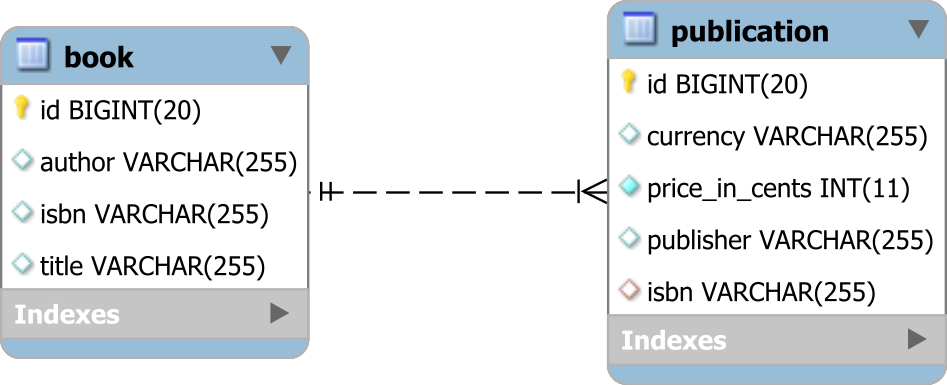
The isbn column on the publication and book tables are linked via a Foreign Key constraint which is the base of our @ManyToOne assocation:
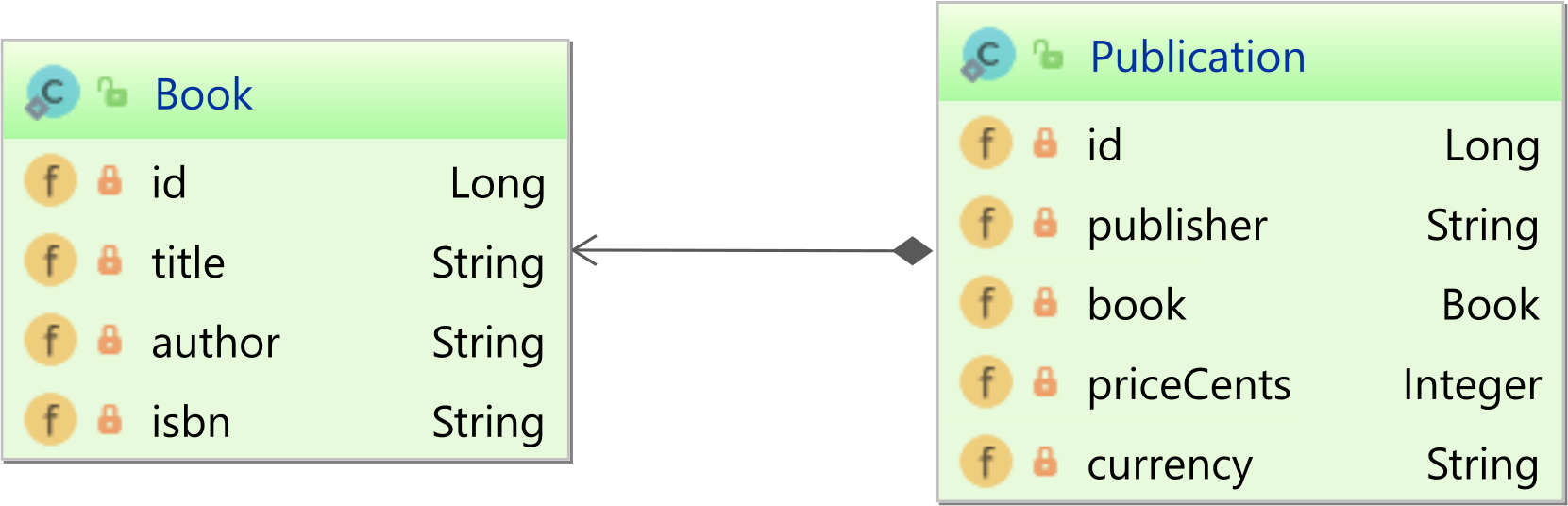
Non Primary-Key @ManyToOne mapping
The Book represents the parent side of the association, and it’s mapped as follows:
1 2 3 4 5 6 7 8 9 10 11 12 13 14 15 16 17 18 | @Entity(name = "Book")
@Table(name = "book")
public class Book
implements Serializable {
@Id
@GeneratedValue
private Long id;
private String title;
private String author;
@NaturalId
private String isbn;
}
|
The isbn column is mapped as a @NaturalId since it can be used as a business key as well.
For more details about the @NaturalId annotation, check out this article.
The Publication represents the child of the association, so it’s going to be mapped like this:
1 2 3 4 5 6 7 8 9 10 11 12 13 14 15 16 17 18 19 20 21 22 23 24 25 26 27 | @Entity(name = "Publication")
@Table(name = "publication")
public class Publication {
@Id
@GeneratedValue
private Long id;
private String publisher;
@ManyToOne(fetch = FetchType.LAZY)
@JoinColumn(
name = "isbn",
referencedColumnName = "isbn"
)
private Book book;
@Column(
name = "price_in_cents",
nullable = false
)
private Integer priceCents;
private String currency;
}
|
By default, the @ManyToOne association assumes that the parent-side entity identifier is to be used to join with the client-side entity Foreign Key column.
However, when using a non-Primary Key association, the referencedColumnName should be used to instruct Hibernate which column should be used on the parent side to establish the many-to-one database relationship.
Testing time
Assuming we have the following entities in our database:
1 2 3 4 5 6 7 8 9 10 11 12 13 14 15 16 17 18 19 | Book book = new Book();
book.setTitle( "High-Performance Java Persistence" );
book.setAuthor( "Vlad Mihalcea" );
book.setIsbn( "978-9730228236" );
entityManager.persist(book);
Publication amazonUs = new Publication();
amazonUs.setPublisher( "amazon.com" );
amazonUs.setBook( book );
amazonUs.setPriceCents( 4599 );
amazonUs.setCurrency( "$" );
entityManager.persist( amazonUs );
Publication amazonUk = new Publication();
amazonUk.setPublisher( "amazon.co.uk" );
amazonUk.setBook( book );
amazonUk.setPriceCents( 3545 );
amazonUk.setCurrency( "&" );
entityManager.persist( amazonUk );
|
Upon fetching the Publication along with its associated Book, we can see that the @ManyToOne association works as expected:
1 2 3 4 5 6 7 8 9 10 11 12 13 14 15 16 17 18 19 20 | Publication publication = entityManager.createQuery(
"select p " +
"from Publication p " +
"join fetch p.book b " +
"where " +
" b.isbn = :isbn and " +
" p.currency = :currency", Publication.class)
.setParameter( "isbn", "978-9730228236" )
.setParameter( "currency", "&" )
.getSingleResult();
assertEquals(
"amazon.co.uk",
publication.getPublisher()
);
assertEquals(
"High-Performance Java Persistence",
publication.getBook().getTitle()
);
|
When executing the JPQL query above, Hibernate generates the following SQL statement:
1 2 3 4 5 6 7 8 9 10 11 12 | SELECT
p.id AS id1_1_0_, b.id AS id1_0_1_,
p.isbn AS isbn5_1_0_, p.currency AS currency2_1_0_,
p.price_in_cents AS price_in3_1_0_,
p.publisher AS publishe4_1_0_,
b.author AS author2_0_1_, b.isbn AS isbn3_0_1_,
b.title AS title4_0_1_
FROM publication p
INNER JOIN
book b ON p.isbn = b.isbn
WHERE b.isbn = '978-9730228236'
AND p.currency = '&'
|
As you can see, the referencedColumnName allows you to customize the JOIN ON clause so that the isbn column is used instead of the default entity identifier.

