2017-12-28
Windows10UpgraderApp.exe - System Error (api-ms-win-core-libraryloader-l1-1-1.dll)
The program can't start because
api-ms-win-core-libraryloader-l1-1-1.dll is missing from your computer. Try reinstalling the program to fix this problem.
Is working.
Renamed C:\Windows10Upgrade\wimgapi.dll -> C:\Windows10Upgrade\wimgapi.dll.ori
Copy C:\Windows\System32\wimgapi.dll -> C:\Windows10Upgrade\wimgapi.dll
Click on Try Again Button.
2017-12-26
What is wtmp.
When I was tracing a linux reboot time, found a line of log as below:
wtmp begins Mon Nov 27 09:12:36 2017
Commands I used:
last -f /var/log/wtmp
last -f /var/log/wtmp.1
Reference URL#1: https://serverfault.com/questions/80939/how-to-find-who-was-logged-in-before-beginning-of-wtmp
Presumably your wtmp file has been rotated, so trylast -f /var/log/wtmp.1orlast -f /var/log/wtmp.0to read the previous files. If those don't work,ls /var/log/wtmp*and see if they're called something else. If they're compressed (.gzextension), decompress 'em.
If they're not there, find whoever setup the bollocks rotation scheme and give them a solid foot-punch to the pantaloons. There's no reason not to keep at least a few weeks' ofwtmplogs.
Reference URL#2: https://www.linuxnix.com/read-view-utmp-wtmp-btmp-file-linuxunix/
VIEW UTMP, WTMP AND BTMP FILES
In Linux/Unix operating systems everything is logged some where. Most of the system logs are logged in to /var/log folder. This folder contains logs related to different services and applications. In this folder we have some files such as utmp, wtmp and btmp. These files contains all the details about login’s and logout’s which are from local as well as from remote systems and system status such as uptime etc.
Some info about utmp, wtmp and btmp
- utmp will give you complete picture of users logins at which terminals, logouts, system events and current status of the system, system boot time (used by uptime) etc.
- wtmp gives historical data of utmp.
- btmp records only failed login attempts.
2017-11-21
Oracle VM VirtualBox - E_FAIL (0x80004005)
Oracle VM VirtualBox
Issue#01
The VM session was closed before any attempt to power it on.
Result Code:
E_FAIL (0x80004005)
Component:
SessionMachine
Interface:
ISession {7844aa05-b02e-4cdd-a04f-ade4a762e6b7}
Only succeeded at 3rd tries:
Issue#02
Update On: 2019-Jan-30_pm021031
Unable to insert the virtual optical diskC:\Program Files\Oracle\VirtualBox\VBoxGuestAdditions.iso into the machine CentOS_7.6.1810.
Could not mount the media/drive'C:\Program Files\Oracle\VirtualBox/VBoxGuestAdditions.iso' (VERR_PDM_MEDIA_LOCKED).
Reference URL: https://askubuntu.com/questions/573596/unable-to-install-guest-additions-cd-image-on-virtual-box
Issue#01
The VM session was closed before any attempt to power it on.
Result Code:
E_FAIL (0x80004005)
Component:
SessionMachine
Interface:
ISession {7844aa05-b02e-4cdd-a04f-ade4a762e6b7}
Only succeeded at 3rd tries:
- Tried#1 - made a copy of the "VM_NAME.xml-prev" file and renamed the copy to "VM_NAME.xml" at URL https://forums.virtualbox.org/viewtopic.php?f=6&t=33196
- Tried#2 - changed the 'virtual disc name - .vbox-prev' to 'virtual disc name .vbox' at URL https://forums.virtualbox.org/viewtopic.php?f=6&t=33196
- Tried#3 - Start as: Detachable Start, printscreen at: https://photos.app.goo.gl/MaOV5V1UVxD27vEN2
Issue#02
Update On: 2019-Jan-30_pm021031
Unable to insert the virtual optical disk
Could not mount the media/drive
| Result Code: | E_FAIL (0x80004005) |
| Component: | ConsoleWrap |
| Interface: | IConsole {872da645-4a9b-1727-bee2-5585105b9eed} |
| Callee: | IMachine {5047460a-265d-4538-b23e-ddba5fb84976} |
Reference URL: https://askubuntu.com/questions/573596/unable-to-install-guest-additions-cd-image-on-virtual-box
I ran into this problem recently (Sept 2017) trying to install Guest Additions into Oracle VM VirtualBox Manager version 5.1.28, in a newly-installed VM for Ubuntu version 16.04.3. The host is Win-10. The problem was that the Guest Additions CD image was already mounted. To fix it:
- In the VM Manager under Settings->Storage, under Controller: Right-click on VBoxGuestAdditions, and select “Remove Attachment." There will be a confirmation box: click “remove.”
- Click the “+” icon next to “Controller," to add new optical drive. A dialog box will open. Choose “Leave Empty-> Okay”
- Open the VM and select Devices->Insert Guest Additions. It should install now. Power off the VM (not the VM Manager) and restart the VM. GuestAdditions should now be working.
2017-09-28
Access restriction: The type 'JPEGCodec' is not API (restriction on required library 'C:\Program Files\Java\jdk1.6.0_45\jre\lib\rt.jar')
Found solution at: https://stackoverflow.com/questions/9266632/access-restriction-is-not-accessible-due-to-restriction-on-required-library
I ran into something similar, I think that the cause of the warning is Eclipse trying to discourage you from using the internalcom.sunpackages that are installed as part of your workspace JRE but which are not part of the public Java API.As Justin says in his answer, changing your compiler settings can hide the warning. A more fine-grained approach is to modify your build path to explicitly allow access to the package in question:
- Open the Libraries tab of the Java Build Path project property window.
- Expand the JRE System Library entry.
- Select "Access rules" and hit the Edit button.
- Click the Add button in the resulting dialog.
- For the new access rule, set the resolution to Accessible and the pattern to
"com/sun/xml/internal/**".After adding this access rule, your project should build without these warning.
2017-09-26
JAR libraries was not in maven repository.
Summary:
- Added Web App Libraries are to resolve eClipse IDE classes/jars unresolve issue.
- Assign Web App Libraries to [Native library location] are to resolve run as maven install, cannot find symbol
regEx - Regular Expression to exclude set of Keywords
RegEx format:
^(?:(?!.SearchText1|SearchText2|SearchText 3|Search Text\|4|SearchText5).)*$\r?\n?
^(?:(?!.No such file or directory|Permission denied|recursive directory loop|Operation not supported on socket).)*$\r?\n?
^(?:(?!.1.2|1.3|1.1.1|appVerision\|null|1.0).)*$\r?\n?
2017-09-25
The following error occurred while importing IMG_XXXX.JPG: A device attached to the system is not functioning.
My case was connected to the fast charging port of the laptop.
Message won't pop up anymore after change to normal USB of the laptop.
2017-09-18
The VM session was closed before any attempt to power it on.
Found reference from: http://www.sysprobs.com/vm-session-closed-attempt-power-virtualbox-32-error
But I was unable to follow through as unable to remove both drive advised in the post.
Then I was still able boot my VM back by:
- Right click VM.
- Choose "Detachable Start"
- With an error pop up.(forgot what was that)
- Then Right click VM.
- And do Normal Start.
2017-07-18
How to force to clear standby memory so can be reuse immediately.
By referring to:
https://blogs.technet.microsoft.com/askperf/2010/08/13/introduction-to-the-new-sysinternals-tool-rammap/
Download
RAMMap v1.5
fromhttps://technet.microsoft.com/en-us/sysinternals/ff700229.aspx
unzip RAMMap.zip
run RAMMap.exe
from menu, select
Empty
> Empty Standby List
2017-06-12
Oracle VM VirtualBox Version 5.1.22
Unable to install antivirus of:
- Avast offline
- Avast online.
- AVG online
2016-12-30
tomcat softlink
#remember what u did in:
/opt/Programs/apache-tomcat-8.0.36/conf/context.xml
<Resources allowLinking="true"></Resources>
#1
Create a real/physical file at dashboard with path:
/opt/Programs/apache-tomcat-8.0.36/webapps/dashboard/gg.jsp
#2
Then go to cp or other module:
cd /opt/Programs/apache-tomcat-8.0.36/webapps/cp
Create softlink so u can access same file & source from dashboard, when u access cp.(which simulate leftnav.jsp) by using script:
ln -s /opt/Programs/apache-tomcat-8.0.36/webapps/dashboard/gg.jsp gg.jsp
#script definition:
ln -s sourceFullPath shortcut
#more refer to:
https://www.cyberciti.biz/faq/unix-creating-symbolic-link-ln-command/
#or:
google linux softlink
2016-12-20
java.lang.NoSuchMethodError
Reference URL: http://timen-zbt.iteye.com/blog/1871152
HTTP Status 500 - Handler processing failed; nested exception is java.lang.NoSuchMethodError: com.company.model.project.ObjectPerson.isMale()Z
注意:这里将superUser属性的类型改为Boolean(boolean的封装类型)
然后将编译后的Person.class拷贝到刚刚发布的项目中替换掉刚才的Person.class文件(注意你没有更改TestNoSuchMethodError类,所以大多你不会想更新这个类)
2016-09-15
SVN tab is missing from eclipse project properties for existing SVN projects after svn plugin/connector crashed.
1st, removed all related SVN plugins and connectors.
Then reinstall again SVN plugins & connectors.
But existing SVN projects won't appear to have SVN enabled.
http://stackoverflow.com/questions/166220/restore-eclipse-subversion-project-connection
Edit: is not applicable to Neon.2.
Trying for mars and successful:
https://docs.google.com/document/d/12Fh-NqSj4-shRVtlVwvjEOqiqMwlsvvfOGh1WpC_U2s/edit?usp=sharing
2016-06-14
1st meet with Jenkins...
https://zh.wikipedia.org/wiki/Jenkins_(%E8%BD%AF%E4%BB%B6)
To be continue...
New Line character(s)
References URL:
- https://en.wikipedia.org/wiki/Newline
Info from Wikipedia
Not sure for Android, using Titanium...
Facing issue to handle CSV files with contents, which lines end with CR+LF("\r\n")
To be continue...
2016-05-11
Spring javax.naming.PartialResultException LDAP Authentication
Reference URL: http://stackoverflow.com/questions/16412236/how-to-resolve-javax-naming-partialresultexception
Sample Errors:
stdout: 2016-05-11 18:16:22,077 INFO: _____ - URL 'ldap://valid-server-ip-address:389/DC=company,DC=com,DC=branch_location', root DN is 'DC=company,DC=com,DC=branch_location'.##### com.company.spring.security.SpringSecurityContextSourceWrapper: 57
stdout: 2016-05-11 18:16:22,138 DEBUG: _____ - AuthenticationSource not set - using default implementation.##### org.springframework.ldap.core.support.AbstractContextSource: 328
stdout: 2016-05-11 18:16:22,140 DEBUG: _____ - Using LDAP pooling..##### org.springframework.ldap.core.support.AbstractContextSource: 346
stdout: 2016-05-11 18:16:22,141 DEBUG: _____ - Trying provider Urls: ldap://valid-server-ip-address:389/dc=company,dc=com,dc=branch_location.##### org.springframework.ldap.core.support.AbstractContextSource: 371
stdout: 2016-05-11 18:16:23,328 DEBUG: _____ - Looking for controller advice: org.springframework.context.support.ClassPathXmlApplicationContext@376f2723: startup date [Wed May 11 18:16:15 SGT 2016]; root of context hierarchy.##### org.springframework.web.servlet.mvc.method.annotation.RequestMappingHandlerAdapter: 618
stdout: 2016-05-11 18:16:23,388 DEBUG: _____ - Looking for exception mappings: org.springframework.context.support.ClassPathXmlApplicationContext@376f2723: startup date [Wed May 11 18:16:15 SGT 2016]; root of context hierarchy.##### org.springframework.web.servlet.mvc.method.annotation.ExceptionHandlerExceptionResolver: 284
stdout: 2016-05-11 18:16:23,782 DEBUG: _____ - Unable to locate LifecycleProcessor with name 'lifecycleProcessor': using default [org.springframework.context.support.DefaultLifecycleProcessor@23da34b5].##### org.springframework.context.support.ClassPathXmlApplicationContext: 858
stdout: 2016-05-11 18:16:23,784 TRACE: _____ - Publishing event in org.springframework.context.support.ClassPathXmlApplicationContext@376f2723: org.springframework.context.event.ContextRefreshedEvent[source=org.springframework.context.support.ClassPathXmlApplicationContext@376f2723: startup date [Wed May 11 18:16:15 SGT 2016]; root of context hierarchy].##### org.springframework.context.support.ClassPathXmlApplicationContext: 332
stdout: 2016-05-11 18:16:23,842 DEBUG: _____ - Got Ldap context on server 'ldap://valid-server-ip-address:389/dc=company,dc=com,dc=branch_location'.##### org.springframework.ldap.core.support.AbstractContextSource: 259
stdout: 2016-05-11 18:16:23,903 DEBUG: _____ - PartialResultException encountered and ignored.##### org.springframework.ldap.core.LdapTemplate: 312
javax.naming.PartialResultException: Unprocessed Continuation Reference(s); remaining name '/'
at com.sun.jndi.ldap.LdapCtx.processReturnCode(LdapCtx.java:2866)
at com.sun.jndi.ldap.LdapCtx.processReturnCode(LdapCtx.java:2840)
at com.sun.jndi.ldap.LdapNamingEnumeration.getNextBatch(LdapNamingEnumeration.java:147)
at com.sun.jndi.ldap.LdapNamingEnumeration.hasMoreImpl(LdapNamingEnumeration.java:216)
at com.sun.jndi.ldap.LdapNamingEnumeration.hasMore(LdapNamingEnumeration.java:189)
at org.springframework.ldap.core.LdapTemplate.search(LdapTemplate.java:295)
at org.springframework.ldap.core.LdapTemplate.search(LdapTemplate.java:237)
at org.springframework.ldap.core.LdapTemplate.search(LdapTemplate.java:624)
at org.springframework.ldap.core.LdapTemplate.search(LdapTemplate.java:535)
at org.springframework.ldap.core.LdapTemplate.search(LdapTemplate.java:462)
at org.springframework.ldap.core.LdapTemplate.search(LdapTemplate.java:483)
at org.springframework.ldap.core.LdapTemplate.search(LdapTemplate.java:503)
at org.springframework.ldap.core.LdapTemplate.authenticate(LdapTemplate.java:1482)
at org.springframework.ldap.core.LdapTemplate.authenticate(LdapTemplate.java:1386)
at test.ldap.UTIL_AUTHEN.main(UTIL_AUTHEN.java:52)
stdout: 2016-05-11 18:16:23,907 DEBUG: _____ - Removing pooling flag for user cn=Administrator,cn=Users,dc=company,dc=com,dc=branch_location.##### com.company.spring.security.SpringSecurityContextSourceWrapper: 76
stdout: 2016-05-11 18:16:23,917 DEBUG: _____ - Got Ldap context on server 'ldap://valid-server-ip-address:389/dc=company,dc=com,dc=branch_location'.##### org.springframework.ldap.core.support.AbstractContextSource: 259
===============================
Administrator
pa55word@2016
===============================
true
stdout: 2016-05-11 18:16:23,921 DEBUG: _____ - Got Ldap context on server 'ldap://valid-server-ip-address:389/dc=company,dc=com,dc=branch_location'.##### org.springframework.ldap.core.support.AbstractContextSource: 259
stdout: 2016-05-11 18:16:23,936 DEBUG: _____ - PartialResultException encountered and ignored.##### org.springframework.ldap.core.LdapTemplate: 312
javax.naming.PartialResultException: Unprocessed Continuation Reference(s); remaining name '/'
at com.sun.jndi.ldap.LdapCtx.processReturnCode(LdapCtx.java:2866)
at com.sun.jndi.ldap.LdapCtx.processReturnCode(LdapCtx.java:2840)
at com.sun.jndi.ldap.LdapNamingEnumeration.getNextBatch(LdapNamingEnumeration.java:147)
at com.sun.jndi.ldap.LdapNamingEnumeration.hasMoreImpl(LdapNamingEnumeration.java:216)
at com.sun.jndi.ldap.LdapNamingEnumeration.hasMore(LdapNamingEnumeration.java:189)
at org.springframework.ldap.core.LdapTemplate.search(LdapTemplate.java:295)
at org.springframework.ldap.core.LdapTemplate.search(LdapTemplate.java:237)
at org.springframework.ldap.core.LdapTemplate.search(LdapTemplate.java:624)
at org.springframework.ldap.core.LdapTemplate.search(LdapTemplate.java:535)
at org.springframework.ldap.core.LdapTemplate.search(LdapTemplate.java:462)
at org.springframework.ldap.core.LdapTemplate.search(LdapTemplate.java:483)
at org.springframework.ldap.core.LdapTemplate.search(LdapTemplate.java:503)
at org.springframework.ldap.core.LdapTemplate.authenticate(LdapTemplate.java:1482)
at org.springframework.ldap.core.LdapTemplate.authenticate(LdapTemplate.java:1386)
at test.ldap.UTIL_AUTHEN.main(UTIL_AUTHEN.java:65)
stdout: 2016-05-11 18:16:23,938 DEBUG: _____ - Removing pooling flag for user cn=Staff Name,cn=Users,dc=company,dc=com,dc=branch_location.##### com.company.spring.security.SpringSecurityContextSourceWrapper: 76
stdout: 2016-05-11 18:16:23,949 DEBUG: _____ - Got Ldap context on server 'ldap://valid-server-ip-address:389/dc=company,dc=com,dc=branch_location'.##### org.springframework.ldap.core.support.AbstractContextSource: 259
===============================
staff.name
pa55word*()
===============================
true
stdout: 2016-05-11 18:16:22,138 DEBUG: _____ - AuthenticationSource not set - using default implementation.##### org.springframework.ldap.core.support.AbstractContextSource: 328
stdout: 2016-05-11 18:16:22,140 DEBUG: _____ - Using LDAP pooling..##### org.springframework.ldap.core.support.AbstractContextSource: 346
stdout: 2016-05-11 18:16:22,141 DEBUG: _____ - Trying provider Urls: ldap://valid-server-ip-address:389/dc=company,dc=com,dc=branch_location.##### org.springframework.ldap.core.support.AbstractContextSource: 371
stdout: 2016-05-11 18:16:23,328 DEBUG: _____ - Looking for controller advice: org.springframework.context.support.ClassPathXmlApplicationContext@376f2723: startup date [Wed May 11 18:16:15 SGT 2016]; root of context hierarchy.##### org.springframework.web.servlet.mvc.method.annotation.RequestMappingHandlerAdapter: 618
stdout: 2016-05-11 18:16:23,388 DEBUG: _____ - Looking for exception mappings: org.springframework.context.support.ClassPathXmlApplicationContext@376f2723: startup date [Wed May 11 18:16:15 SGT 2016]; root of context hierarchy.##### org.springframework.web.servlet.mvc.method.annotation.ExceptionHandlerExceptionResolver: 284
stdout: 2016-05-11 18:16:23,782 DEBUG: _____ - Unable to locate LifecycleProcessor with name 'lifecycleProcessor': using default [org.springframework.context.support.DefaultLifecycleProcessor@23da34b5].##### org.springframework.context.support.ClassPathXmlApplicationContext: 858
stdout: 2016-05-11 18:16:23,784 TRACE: _____ - Publishing event in org.springframework.context.support.ClassPathXmlApplicationContext@376f2723: org.springframework.context.event.ContextRefreshedEvent[source=org.springframework.context.support.ClassPathXmlApplicationContext@376f2723: startup date [Wed May 11 18:16:15 SGT 2016]; root of context hierarchy].##### org.springframework.context.support.ClassPathXmlApplicationContext: 332
stdout: 2016-05-11 18:16:23,842 DEBUG: _____ - Got Ldap context on server 'ldap://valid-server-ip-address:389/dc=company,dc=com,dc=branch_location'.##### org.springframework.ldap.core.support.AbstractContextSource: 259
stdout: 2016-05-11 18:16:23,903 DEBUG: _____ - PartialResultException encountered and ignored.##### org.springframework.ldap.core.LdapTemplate: 312
javax.naming.PartialResultException: Unprocessed Continuation Reference(s); remaining name '/'
at com.sun.jndi.ldap.LdapCtx.processReturnCode(LdapCtx.java:2866)
at com.sun.jndi.ldap.LdapCtx.processReturnCode(LdapCtx.java:2840)
at com.sun.jndi.ldap.LdapNamingEnumeration.getNextBatch(LdapNamingEnumeration.java:147)
at com.sun.jndi.ldap.LdapNamingEnumeration.hasMoreImpl(LdapNamingEnumeration.java:216)
at com.sun.jndi.ldap.LdapNamingEnumeration.hasMore(LdapNamingEnumeration.java:189)
at org.springframework.ldap.core.LdapTemplate.search(LdapTemplate.java:295)
at org.springframework.ldap.core.LdapTemplate.search(LdapTemplate.java:237)
at org.springframework.ldap.core.LdapTemplate.search(LdapTemplate.java:624)
at org.springframework.ldap.core.LdapTemplate.search(LdapTemplate.java:535)
at org.springframework.ldap.core.LdapTemplate.search(LdapTemplate.java:462)
at org.springframework.ldap.core.LdapTemplate.search(LdapTemplate.java:483)
at org.springframework.ldap.core.LdapTemplate.search(LdapTemplate.java:503)
at org.springframework.ldap.core.LdapTemplate.authenticate(LdapTemplate.java:1482)
at org.springframework.ldap.core.LdapTemplate.authenticate(LdapTemplate.java:1386)
at test.ldap.UTIL_AUTHEN.main(UTIL_AUTHEN.java:52)
stdout: 2016-05-11 18:16:23,907 DEBUG: _____ - Removing pooling flag for user cn=Administrator,cn=Users,dc=company,dc=com,dc=branch_location.##### com.company.spring.security.SpringSecurityContextSourceWrapper: 76
stdout: 2016-05-11 18:16:23,917 DEBUG: _____ - Got Ldap context on server 'ldap://valid-server-ip-address:389/dc=company,dc=com,dc=branch_location'.##### org.springframework.ldap.core.support.AbstractContextSource: 259
===============================
Administrator
pa55word@2016
===============================
true
stdout: 2016-05-11 18:16:23,921 DEBUG: _____ - Got Ldap context on server 'ldap://valid-server-ip-address:389/dc=company,dc=com,dc=branch_location'.##### org.springframework.ldap.core.support.AbstractContextSource: 259
stdout: 2016-05-11 18:16:23,936 DEBUG: _____ - PartialResultException encountered and ignored.##### org.springframework.ldap.core.LdapTemplate: 312
javax.naming.PartialResultException: Unprocessed Continuation Reference(s); remaining name '/'
at com.sun.jndi.ldap.LdapCtx.processReturnCode(LdapCtx.java:2866)
at com.sun.jndi.ldap.LdapCtx.processReturnCode(LdapCtx.java:2840)
at com.sun.jndi.ldap.LdapNamingEnumeration.getNextBatch(LdapNamingEnumeration.java:147)
at com.sun.jndi.ldap.LdapNamingEnumeration.hasMoreImpl(LdapNamingEnumeration.java:216)
at com.sun.jndi.ldap.LdapNamingEnumeration.hasMore(LdapNamingEnumeration.java:189)
at org.springframework.ldap.core.LdapTemplate.search(LdapTemplate.java:295)
at org.springframework.ldap.core.LdapTemplate.search(LdapTemplate.java:237)
at org.springframework.ldap.core.LdapTemplate.search(LdapTemplate.java:624)
at org.springframework.ldap.core.LdapTemplate.search(LdapTemplate.java:535)
at org.springframework.ldap.core.LdapTemplate.search(LdapTemplate.java:462)
at org.springframework.ldap.core.LdapTemplate.search(LdapTemplate.java:483)
at org.springframework.ldap.core.LdapTemplate.search(LdapTemplate.java:503)
at org.springframework.ldap.core.LdapTemplate.authenticate(LdapTemplate.java:1482)
at org.springframework.ldap.core.LdapTemplate.authenticate(LdapTemplate.java:1386)
at test.ldap.UTIL_AUTHEN.main(UTIL_AUTHEN.java:65)
stdout: 2016-05-11 18:16:23,938 DEBUG: _____ - Removing pooling flag for user cn=Staff Name,cn=Users,dc=company,dc=com,dc=branch_location.##### com.company.spring.security.SpringSecurityContextSourceWrapper: 76
stdout: 2016-05-11 18:16:23,949 DEBUG: _____ - Got Ldap context on server 'ldap://valid-server-ip-address:389/dc=company,dc=com,dc=branch_location'.##### org.springframework.ldap.core.support.AbstractContextSource: 259
===============================
staff.name
pa55word*()
===============================
true
<bean id="contextSourceLdap"
class="com.customized.spring.security.SpringSecurityContextSourceWrapper">
<constructor-arg value="${LDAP.SERVER}:389/${LDAP.DOMAIN}"/>
<property name="userDn" value="${LDAP.USERDN}"/>
<property name="password" value="${LDAP.PASSWORD}"/>
</bean>
<bean id="contextSourceLdap"
class="com.customized.spring.security.SpringSecurityContextSourceWrapper">
<constructor-arg value="${LDAP.SERVER}:3268/${LDAP.DOMAIN}"/>
<property name="userDn" value="${LDAP.USERDN}"/>
<property name="password" value="${LDAP.PASSWORD}"/>
</bean>
2016-04-23
FWD: Malaysia vs Singapore: Which Country Is Cheaper To Live In?
Source URL: https://www.imoney.my/articles/malaysia-vs-singapore-which-country-is-cheaper-to-live-in
Image URL: https://www.imoney.my/articles/wp-content/uploads/1995/04/R2_INFOGRAPHIC-Malaysia-vs.-Singapore-Which-country-will-let-you-earn-more-save-more-and-spend-less-3-1.jpg
Written by Fiona HoIllustration by Michelle Leong
Who thinks the cost of living in Singapore is much higher than in Malaysia? Well, most people actually, considering that the island republic just topped theEconomist Intelligence Unit’s 2016 Worldwide Cost Of Living Survey, making that the third year in a row. The survey compares the cost of living in 133 cities around the world.
Cost of living is the amount of money you need to sustain a certain way of living, including paying for basic expenses like food, clothing and housing.
Of course, if you take it at face value, cost of living is indeed higher in Singapore, especially since Singapore has already attained developed nation status and is also a cosmopolitan nation, so naturally things are more expensive there.
Housing and cars in the island nation are also way more expensive to own there. Due to its land scarcity, housing and rental rates in Singapore cost up to three times more than in Malaysia!
Transportation, on the other hand, is way more advanced in Singapore, hence many residents in the island do not need to own a car. That is not something many Malaysians can do yet, as public transportation is only robust in certain areas of the Klang Valley.
If you factor in the currency conversion rate (which stands at 2.9 at this point in writing), it might appear at first, that it would be much more expensive to live in Singapore than in Malaysia.
However, for an apple-to-apple comparison, currency conversion should not be factored in when assessing the difference in cost of living in both countries.
Cost of living is more accurately adjudged when you compare the average income of a nation versus the average prices of goods and services, especially in purchasing the necessities for sustaining a decent livelihood.
To date, Malaysia’s average monthly disposable salary is RM3,505 (US$869.10) while Singapore’s is S$4,152 (US$3,028.38). The bad news is, Malaysians do not only earn less than their neighbours across the causeway, the weaker Ringgit currency compared to the US dollar (with an exchange rate of roughly 3.9 versus the Singapore dollar’s 1.36 at this point in writing) also means that imported goods that are sold in Malaysia often cost more in the Ringgit quantum.
For instance, apparel like a pair of Nike shoes and Levi’s jeans could cost up to two times more in the Ringgit quantum, while a typical McDonald’s combo meal is sold for RM12 in Malaysia, compared to just S$7.50 in Singapore.
Though the comparison of cost of living between these two countries do not just comprise comparing prices of clothing and McDonald’s meal, there are many areas that Malaysia prices top its counterparts across the causeway.
So, which country has it better? View our infographic to find out.
*Prices shown in the infographic are averages.
Article is updated as of 22 April 2016.
|
| R2_INFOGRAPHIC-Malaysia-vs.-Singapore-Which-country-will-let-you-earn-more-save-more-and-spend-less-3-1.jpg |
2016-04-17
Fwd: Visceral Fat (VFat)
Visceral Fat (VFat)
Source URL: https://www.facebook.com/stephanie.meiwan/media_set?set=a.10154038076566192.1073741894.509476191&type=3
Visceral Fat is the fat that is wrapped around our heart and other vital organs. It is also the fat that is deposited around our arteries. Too much of visceral fat deposit causes blockage of blood flow in arteries. HEART ATTACK happens when the blockage occurs in heart arteriea; STROKE happens when the blockage occurs in brain arteries. BAD NEWS is visceral fat cannot be burn through any exercise at all. So if anyone of you out there who decides to start exercising hoping to burn your visceral fat, sadly to know that no matter how much you exercise, your visceral fat will stay the same. Visceral fat can only be reduced through diet (what you eat daily) and supplements.
Do you know how many layers of visceral fat is wrapping and covering your heart?
1 to 4: Excellent
5 to 8: Healthy
9 to 12: Bad
13 and above: Alarming
2016-03-22
Spring Webflow redirect url with execution value injected.
Reference URL: https://github.com/icescrum/iceScrum/issues/8
<Connector address="127.0.0.1" port="8080" protocol="org.apache.coyote.http11.Http11NioProtocol" connectionTimeout="20000" redirectPort="8443" scheme="https" proxyPort="443" />
Related term:
- tomcat
- Spring
- Webflow
- redirect
- inject execution value
2016-01-26
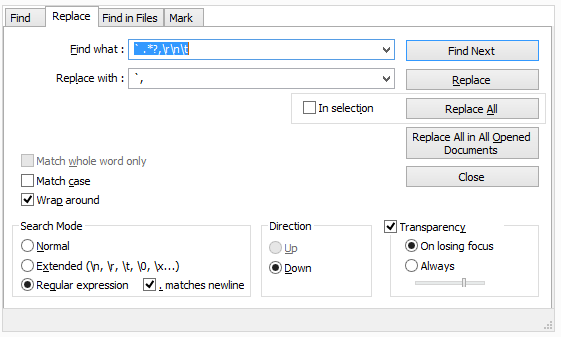
Search in notepad++ [To be continue]
notepad++_find_replace_mysql_createscript_to_selectscript
Find What: "` .*?,\r\n\t"
Replace with: "`, "
Find: "` .*?,\r\n\t"
Replace: "`" \)\;\r\n\tsb.appendCustomizedString\( ", "
(exclude 1st and last character of double quote["] )
to
Subscribe to:
Posts (Atom)